Сегодня речь пойдет о MySQL и о настройке UTF8 кодировки по-умолчанию.
Тема заезжена, но как я убедился за прошедшую неделю, мало кто в состоянии нормально пояснить какие параметры и куда надо прописать для полноценной работы с UTF8 в MySQL. К сожалению, ситуация на тематических блогах оставляет желать лучшего. Основной тип ответа — приведение соедржимого конфигурационного файла с комментарием типа “попробуй, у меня это работает”.
Основная цель данного поста — выяснить, какие параметры и с какими значениями следует прописать в конфигурационный файл my.cnf (my.ini) для дальнейшей беспроблемной работы с Юникодом.
- Рабочее окружение
- Параметры кодировок MySQL
- Кодировка (character set) и представление (collation) сервера
- Кодировка (character set) и представление (collation) базы данных
- Кодировка (character set) и представление (collation) таблиц
- Кодировка (character set) и представление (collation) колонок в таблице
- skip-character-set-client-handshake
- Верификация настроек
- Ссылки
- Connection Character Set and Collation System Variables
- Impermissible Client Character Sets
- Client Program Connection Character Set Configuration
- SQL Statements for Connection Character Set Configuration
- Connection Character Set Error Handling
- Connect-Time Error Handling
- Runtime Error Handling
- 10.3.3 Database Character Set and Collation
- Навигация по записям
Рабочее окружение
UTF8 на данный момент у меня успешно работает в Мастер-Слейв конфигурации:
- MySQL версии 5.1.66
- Два сервера CentOS версии 6.3
- Репликация между серверами Master-Slave на базе SSL
Любой внешний клиент в состоянии корректно работать с UTF8 базой (проверено на EMS Manager for MySQL c Windows 8 x64).
Все опции и настройки я привожу для версии сервера 5.1.x, однако с минимальными (а то и вовсе без оных) изменениями все это будет работать и на версиях 5.5.x и 5.6.x.
Параметры кодировок MySQL
Довольно часто приходится видеть в ответах на вопросы о настройке UTF8 следующее:
[mysqld]
init_connect='SET collation_connection = utf8_general_ci'
init_connect='SET NAMES utf8'
default-character-set=utf8
character-set-server=utf8
collation-server=utf8_general_ci
skip-character-set-client-handshake
Предполагается, что после вставки всего этого добра (тут кстати есть противоречащие друг другу опции) в конфигурационный файл my.cnf (my.ini) магический Юникод начнет работать.
Но давайте забудем о списке и попытаемся разбираться со всеми опциями сами и начнем с самого начала. То есть с документации. Потому как все это прекрасно описано в документации MySQL на официальном сайте. Я лишь постараюсь последовательно рассказать о параметрах сервера и прояснить неясные моменты.
Главный раздел по описанию кодировок (character sets) и их представлений (collations — используется например при сортировке) в контексте сервера, базы, таблиц — это секция 10.1.3. Specifying Character Sets and Collations.
Символьная кодировка может быть задана для:
- сервера,
- базы данных,
- таблицы и
- колонок в таблице.
Сделано это для гибкой настройки баз данных и доступа клиентов с разными кодировками. Однако, последнее не входит в область рассмотрения данного поста, поэтому будем рассматривать вариант с кодировкой UTF8 настроенной для всего по-умолчанию.
Все параметры могут быть переданы серверу тремя разными способами:
- через командную строку mysqld
- через конфигурационный файл my.cnf (my.ini)
- через опции компиляции.
Второй и третий варианты рассматриваться не будут. Тут уместно будет просто прочитать официальные доки — в каждом разделе приведены примеры конфигурации с использованием всех трех способов. Я же буду использовать первый вариант.
Кодировка (character set) и представление (collation) сервера
Секция 10.1.3.1. Server Character Set and Collation
Кодировка (characher set) — набор используемых символов.
Представление (collation) — набор правил для сравнения символов в наборе.
Тут есть несколько фундаментальных вещей которые надо понимать.
Основные параметры используемые в контексте сервера — это character_set_server и collation_server. Оба параметра влияют на определение кодировки и отображения сервера MySQL.
Можно задать оба параметра либо только один из них. При этом важно знать как задача того или иного влияет на определение отсутствующего:
Не заданы — используются значения по умолчанию (дефолтные),
Заданы оба — используются указанные кодировка и ее представление,
Задана только кодировка — ее представление выставляется по умолчанию для данного типа кодировки. Что это значит? Для каждого типа кодировки есть ее дефолтное представление, например, дефолтная кодировка сервера —
latin1, а дефолтное отображение для нее —latin1_swedish_ci.
Посмотреть соответствие кодировки и ее дефолтного представления можно используя команду:SHOW COLLATION LIKE ‘your_character_set_name’;
mysql> SHOW COLLATION LIKE ‘latin1%’;
+-------------------+---------+----+---------+----------+---------+ | Collation | Charset | Id | Default | Compiled | Sortlen | +-------------------+---------+----+---------+----------+---------+ | latin1_german1_ci | latin1 | 5 | | Yes | 1 | | latin1_swedish_ci | latin1 | 8 | Yes | Yes | 1 | | latin1_danish_ci | latin1 | 15 | | Yes | 1 | | latin1_german2_ci | latin1 | 31 | | Yes | 2 | | latin1_bin | latin1 | 47 | | Yes | 1 | | latin1_general_ci | latin1 | 48 | | Yes | 1 | | latin1_general_cs | latin1 | 49 | | Yes | 1 | | latin1_spanish_ci | latin1 | 94 | | Yes | 1 | +-------------------+---------+----+---------+----------+---------+
Поле Default дает ответ о представлении выбранной кодировки.
В нашем случае, при настройке дефолтной кодировки в UTF8, параметры должны быть определены, так как могут быть использованы при определении кодировки или представления базы данных:
Наши команды:
my.cnf (my.ini)
Дефолтное представление для utf8 — utf8_general_ci, так что если бы мы его использовали вместо utf8_unicode_ci, то параметр collation_server можно было бы вообще опустить.
Кодировка (character set) и представление (collation) базы данных
Секция 10.1.3.2. Database Character Set and Collation
Секция 10.1.4. Connection Character Sets and Collations
Тут есть два варианта определения кодировки и представления:
явно — при выполнении запроса на создание базы данных:
CREATE DATABASE db_name CHARACTER SET latin1 COLLATE latin1_swedish_ci;
неявно через переменные
character_set_databaseиcollation_database.
Однако, эти переменные нельзя задать явно ни в командной строке ни в конфигурационном файле. Как они инициализируются — чуть ниже.
Вообще при работе с базой данных огромную роль помимо серверных настроек играют настройки клиент-серверного соединения (connection). На этом этапе вступают в игру следующие специфичные для соединения параметры:
character_set_client— кодировка в которой посылается запрос от клиентаcharacter_set_connection— кодировка используемая для конвертации пришедшего запроса (statement’а)character_set_results— кодировку, в которую сервер должен перевести результат перед его отправкой клиенту
Есть еще представление кодировки соединения (colation_connection). Для чего нужен этот параметр думаю пояснять не надо.
Озадачиваться проблемой инициализации всех этих переменных не стоит (хотя в нашем случае присвоить им значения необходимо).
Есть способ проще: существует два типа запросов (statements) которые задают настройки соединения клиента с сервером группой:
Запрос SET NAMES ‘charset_name’ [COLLATE ‘collation_name’]
Параметр определяет в какой кодировке теперь будут приходить сообщения для сервера от клиента. Прелесть в том, что запрос SET NAMES x эквивалентен следующей группе:
SET character_set_client = x;
SET character_set_results = x;
SET character_set_connection = x;
Для определении представления кодировки соединения (colation_connection) отличного от дефолтного, следует дополнить запрос:
SET NAMES x COLLATE y
А так как у нас utf8 и ее дефолтное представление utf8_general_ci, то нам нужно выпонить полный запрос:
SET NAMES utf8 COLLATE utf8_unicode_ci
Таким образом, используя только этот запрос, можно добиться корректной UTF8 инициализации соединения.
Однако, тут есть один нюанс:
SET NAMES x, как понятно из определения, определяет настройку клиента при коннекте к серверу. Но что делать, если клиент — сам mysql.exe и нам хочется установить collation_connection по-умолчанию, не выполняя каждый раз SET NAMES x при коннекте?
Для этих целей, существует еще один параметр — default_character_set.
Он эквивалентен запросу SET NAMES utf8. В случае его использования задать collation_connection отличный от дефолтного уже не получится, поэтому придется заюзать еще одну команду init_connect (так как напрямую collation_connection нельзя прописать в конфигурационном файле):
init_connect=‘SET collation_connection = utf8_unicode_ci’
Но и тут есть еще одно но: init_connect команда не выполняется для SUPER пользователей — пользователей, обладающих привилегией SUPER. root входит в этот перечень, поэтому при коннекте root’ом команду SET collation_connection = utf8_unicode_ci все же придется выполнить вручную.
Запрос SET CHARACTER SET charset_name
Запрос групповой и он также эквивалентен следующей группе:
За более детальной информацией отсылаю по двум источникам — собственно к официальной документации и прекрасно оформленному ответу на stackoverflow.com.
Для нашей задачи вполне хватает первого параметра вместе с дополнительной командой.
Подытожим: различные сценарии и что юзается на каждом из них — относительно к настройкам соединения:
- Если к базе коннектится mysql.exe клиент с пользователем с привилегией SUPER:
- срабатывает опция в конфигурационном файле
default_character_set = utf8 - надо выполнить вручную команду
init_connect='SET collation_connection = utf8_unicode_ci'
- срабатывает опция в конфигурационном файле
- Если к базе коннектится mysql.exe клиент с пользователем без привилегии SUPER:
- срабатывает опция в конфигурационном файле
default_character_set = utf8 - срабатывает команда в конфигурационном файле
init_connect='SET collation_connection = utf8_unicode_ci'
- срабатывает опция в конфигурационном файле
- Если к базе коннектится внешний клиент:
- надо выполнить вручную команду
SET NAMES utf8 COLLATE utf8_unicode_ci
- надо выполнить вручную команду
Наши команды:
my.cnf (my.ini)
Кодировка (character set) и представление (collation) таблиц
Секция 10.1.3.3. Table Character Set and Collation
Тут все довольно просто. Задать кодировку и ее представление можно через команды:
Тут главное иметь в виду, что если эти настройки не заданы, то берутся настройки базы данных (см. пред. раздел). Нам эти настройки не интересны.
Кодировка (character set) и представление (collation) колонок в таблице
Секция 10.1.3.4. Column Character Set and Collation
Тут по аналогии с пред. секцией. Если параметры кодировок не указаны, берутся те, что указывались для таблицы.
skip-character-set-client-handshake
Помимо освещенных параметров, есть еще один довольно часто фигурирующий в разного рода источниках — skip-character-set-client-handshake. Установка этого параметра позволит проигнорировать информацию клиента о кодировке. Я данный параметр не использовал.
Верификация настроек
Итак, вот финальный snapshot наших изменений в файле my.cnf (my.ini):
После применения всех опций и рестарта сервера mysql для проверки настроек можно воспользоваться командами SHOW VARIABLES LIKE 'char%' и SHOW VARIABLES LIKE 'collation%';
Состояние среды до изменений:
mysql> SHOW VARIABLES LIKE'character%';
+--------------------------+----------------------------+
| Variable_name | Value |
+--------------------------+----------------------------+
| character_set_client | latin1 |
| character_set_connection | latin1 |
| character_set_database | latin1 |
| character_set_filesystem | binary |
| character_set_results | latin1 |
| character_set_server | latin1 |
| character_set_system | utf8 |
| character_sets_dir | /usr/share/mysql/charsets/ |
+--------------------------+----------------------------+
mysql> SHOW VARIABLES LIKE 'collation%';
+----------------------+-------------------+
| Variable_name | Value |
+----------------------+-------------------+
| collation_connection | latin1_swedish_ci |
| collation_database | latin1_swedish_ci |
| collation_server | latin1_swedish_ci |
+----------------------+-------------------+
Состояние среды после изменений (в случае, если вы приконнектились не SUPER пользователем):
mysql> SHOW VARIABLES LIKE 'character%';
+--------------------------+----------------------------+
| Variable_name | Value |
+--------------------------+----------------------------+
| character_set_client | utf8 |
| character_set_connection | utf8 |
| character_set_database | utf8 |
| character_set_filesystem | binary |
| character_set_results | utf8 |
| character_set_server | utf8 |
| character_set_system | utf8 |
| character_sets_dir | /usr/share/mysql/charsets/ |
+--------------------------+----------------------------+
mysql> SHOW VARIABLES LIKE 'collation%';
+----------------------+-----------------+
| Variable_name | Value |
+----------------------+-----------------+
| collation_connection | utf8_unicode_ci |
| collation_database | utf8_unicode_ci |
| collation_server | utf8_unicode_ci |
+----------------------+-----------------+
Для примера, вот отличие при соединении через mysql.exe пользователем с и без привилегии SUPER:
mysql> SHOW VARIABLES LIKE 'collation%';
+----------------------+-----------------+
| Variable_name | Value |
+----------------------+-----------------+
| collation_connection | **utf8_general_ci** |
| collation_database | utf8_unicode_ci |
| collation_server | utf8_unicode_ci |
+----------------------+-----------------+
с привилегией и выполненной вручную командой ‘SET collation_connection = utf8_unicode_ci’:
mysql> SHOW VARIABLES LIKE 'collation%';
+----------------------+-----------------+
| Variable_name | Value |
+----------------------+-----------------+
| collation_connection | utf8_unicode_ci |
| collation_database | utf8_unicode_ci |
| collation_server | utf8_unicode_ci |
+----------------------+-----------------+
mysql> SHOW VARIABLES LIKE 'collation%';
+----------------------+-----------------+
| Variable_name | Value |
+----------------------+-----------------+
| collation_connection | utf8_unicode_ci |
| collation_database | utf8_unicode_ci |
| collation_server | utf8_unicode_ci |
+----------------------+-----------------+Поздравляю, теперь ваши база, таблицы и все в таблицах по-умолчанию в кодировке UTF8.
Ссылки
- Официальное руководство MySQL версии 5.1
- Отличие utf8_unicode_ci от utf8_general_ci
- “MySQL Character Set Support” на informit.com позволит вам больше узнать о том что есть characher set и collation.
A is what a client program makes when it
connects to the server, to begin a session within which it
interacts with the server. The client sends SQL statements, such
as queries, over the session connection. The server sends
responses, such as result sets or error messages, over the
connection back to the client.
Connection Character Set and Collation System Variables
Several character set and collation system variables relate to a
client’s interaction with the server. Some of these have been
mentioned in earlier sections:
Additional character set and collation system variables are
involved in handling traffic for the connection between a client
and the server. Every client has session-specific
connection-related character set and collation system variables.
These session system variable values are initialized at connect
time, but can be changed within the session.
Several questions about character set and collation handling for
client connections can be answered in terms of system variables:
What character set are statements in when they leave the
client?The server takes the
character_set_clientsystem
variable to be the character set in which statements are
sent by the client.What character set should the server translate statements to
after receiving them?To determine this, the server uses the
character_set_connection
andcollation_connection
system variables:What character set should the server translate query results
to before shipping them back to the client?The
character_set_results
system variable indicates the character set in which the
server returns query results to the client. This includes
result data such as column values, result metadata such as
column names, and error messages.To tell the server to perform no conversion of result sets
or error messages, set
character_set_resultsto
NULLorbinary:SET character_set_results = NULL; SET character_set_results = binary;
To see the values of the character set and collation system
variables that apply to the current session, use this statement:
SELECT * FROM performance_schema.session_variables
WHERE VARIABLE_NAME IN ( 'character_set_client', 'character_set_connection', 'character_set_results', 'collation_connection'
) ORDER BY VARIABLE_NAME;
SHOW SESSION VARIABLES LIKE 'character\_set\_%';
SHOW SESSION VARIABLES LIKE 'collation\_%'; Clients can fine-tune the settings for these variables, or
depend on the defaults (in which case, you can skip the rest of
this section). If you do not use the defaults, you must change
the character settings for each connection to the
server.
Impermissible Client Character Sets
The character_set_client system
variable cannot be set to certain character sets:
ucs2
utf16
utf16le
utf32
Attempting to use any of those character sets as the client
character set produces an error:
mysql> SET character_set_client = 'ucs2';
ERROR 1231 (42000): Variable 'character_set_client'
can't be set to the value of 'ucs2'
Client Program Connection Character Set Configuration
When a client connects to the server, it indicates which
character set it wants to use for communication with the server.
(Actually, the client indicates the default collation for that
character set, from which the server can determine the character
set.) The server uses this information to set the
character_set_client,
character_set_results,
character_set_connection system
variables to the character set, and
collation_connection to the
character set default collation. In effect, the server performs
the equivalent of a SET NAMES
operation.
If the server does not support the requested character set or
collation, it falls back to using the server character set and
collation to configure the connection. For additional detail
about this fallback behavior, see
Connection Character Set Error Handling.
In the absence of other information, each client uses the
compiled-in default character set, usually
utf8mb4.The OS character set is mapped to the closest MySQL
character set if there is no exact match. If the client does
not support the matching character set, it uses the
compiled-in default. For example,utf8
andutf-8map to
utf8mb4, anducs2is
not supported as a connection character set, so it maps to
the compiled-in default.mysql_options(mysql, MYSQL_SET_CHARSET_NAME, MYSQL_AUTODETECT_CHARSET_NAME);
[mysql]
default-character-set=koi8r
If you are using the client with
auto-reconnect enabled (which is not recommended), it is
preferable to use the charset command rather
than SET NAMES. For example:
mysql> charset koi8r
Charset changed
The charset command issues a
SET NAMES statement, and also
changes the default character set that
uses when it reconnects after the connection has dropped.
When configuration client programs, you must also consider the
environment within which they execute. See
Section 10.5, “Configuring Application Character Set and Collation”.
SQL Statements for Connection Character Set Configuration
After a connection has been established, clients can change the
character set and collation system variables for the current
session. These variables can be changed individually using
SET
statements, but two more convenient statements affect the
connection-related character set system variables as a group:
SET NAMESindicates what
character set the client uses to send SQL statements to the
server. Thus,SETtells the server, “future
NAMES 'cp1251'
incoming messages from this client are in character set
cp1251.” It also specifies the
character set that the server should use for sending results
back to the client. (For example, it indicates what
character set to use for column values if you use a
SELECTstatement that
produces a result set.)A
SET NAMES
 'charset_name'
statement is equivalent to these three statements:SET character_set_client = charset_name; SET character_set_results = charset_name; SET character_set_connection = charset_name;Setting
character_set_connectionto
charset_namealso implicitly sets
collation_connectionto the
default collation for
charset_name. It is unnecessary
to set that collation explicitly. To specify a particular
collation to use for
collation_connection, add a
COLLATEclause:SET NAMES 'charset_name' COLLATE 'collation_name'SET CHARACTER SET‘
'charset_nameSET CHARACTER SETis similar
toSET NAMESbut sets
character_set_connection
andcollation_connectionto
character_set_databaseand
collation_database(which,
as mentioned previously, indicate the character set and
collation of the default database).A
SETstatement
CHARACTER SET
charset_name
is equivalent to these three statements:SET character_set_client = charset_name; SET character_set_results = charset_name; SET collation_connection = @@collation_database;
Example: Suppose that column1 is defined as
CHAR(5) CHARACTER SET latin2. If you do not
say SET NAMES or
SET CHARACTER SET, then for
SELECT column1 FROM t, the server sends back
all the values for column1 using the
character set that the client specified when it connected. On
the other hand, if you say SET NAMES 'latin1'
or SET CHARACTER SET 'latin1' before issuing
the SELECT statement, the server
converts the latin2 values to
latin1 just before sending results back.
Conversion may be lossy for characters that are not in both
character sets.
Connection Character Set Error Handling
Attempts to use an inappropriate connection character set or
collation can produce an error, or cause the server to fall back
to its default character set and collation for a given
connection. This section describes problems that can occur when
configuring the connection character set. These problems can
occur when establishing a connection or when changing the
character set within an established connection.
Connect-Time Error Handling
Some character sets cannot be used as the client character set;
see
Impermissible Client Character Sets.
If you specify a character set that is valid but not permitted
as a client character set, the server returns an error:
$> mysql --default-character-set=ucs2
ERROR 1231 (42000): Variable 'character_set_client' can't be set to
the value of 'ucs2'
If you specify a character set that the client does not
recognize, it produces an error:
$> mysql --default-character-set=bogus
mysql: Character set 'bogus' is not a compiled character set and is
not specified in the '/usr/local/mysql/share/charsets/Index.xml' file
ERROR 2019 (HY000): Can't initialize character set bogus
(path: /usr/local/mysql/share/charsets/)
If you specify a character set that the client recognizes but
the server does not, the server falls back to its default
character set and collation. Suppose that the server is
configured to use latin1 and
latin1_swedish_ci as its defaults, and that
it does not recognize gb18030 as a valid
character set. A client that specifies
--default-character-set=gb18030 is
able to connect to the server, but the resulting character set
is not what the client wants:
mysql> SHOW SESSION VARIABLES LIKE 'character\_set\_%';
+--------------------------+--------+
| Variable_name | Value |
+--------------------------+--------+
| character_set_client | latin1 |
| character_set_connection | latin1 |
...
| character_set_results | latin1 |
...
+--------------------------+--------+
mysql> SHOW SESSION VARIABLES LIKE 'collation_connection';
+----------------------+-------------------+
| Variable_name | Value |
+----------------------+-------------------+
| collation_connection | latin1_swedish_ci |
+----------------------+-------------------+
You can see that the connection system variables have been set
to reflect a character set and collation of
latin1 and
latin1_swedish_ci. This occurs because the
server cannot satisfy the client character set request and falls
back to its defaults.
In this case, the client cannot use the character set that it
wants because the server does not support it. The client must
either be willing to use a different character set, or connect
to a different server that supports the desired character set.
The same problem occurs in a more subtle context: When the
client tells the server to use a character set that the server
recognizes, but the default collation for that character set on
the client side is not known on the server side. This occurs,
for example, when a MySQL 8.0 client wants to connect to a MySQL
5.7 server using utf8mb4 as the client
character set. A client that specifies
--default-character-set=utf8mb4 is
able to connect to the server. However, as in the previous
example, the server falls back to its default character set and
collation, not what the client requested:
mysql> SHOW SESSION VARIABLES LIKE 'character\_set\_%';
+--------------------------+--------+
| Variable_name | Value |
+--------------------------+--------+
| character_set_client | latin1 |
| character_set_connection | latin1 |
...
| character_set_results | latin1 |
...
+--------------------------+--------+
mysql> SHOW SESSION VARIABLES LIKE 'collation_connection';
+----------------------+-------------------+
| Variable_name | Value |
+----------------------+-------------------+
| collation_connection | latin1_swedish_ci |
+----------------------+-------------------+
Why does this occur? After all, utf8mb4 is
known to the 8.0 client and the 5.7 server, so both of them
recognize it. To understand this behavior, it is necessary to
understand that when the client tells the server which character
set it wants to use, it really tells the server the default
collation for that character set. Therefore, the aforementioned
behavior occurs due to a combination of factors:
The default collation for
utf8mb4differs
between MySQL 5.7 and 8.0
(utf8mb4_general_cifor 5.7,
utf8mb4_0900_ai_cifor 8.0).When the 8.0 client requests a character set of
utf8mb4, what it sends to the server is
the default 8.0utf8mb4collation; that
is, theutf8mb4_0900_ai_ci.utf8mb4_0900_ai_ciis implemented only as
of MySQL 8.0, so the 5.7 server does not recognize it.Because the 5.7 server does not recognize
utf8mb4_0900_ai_ci, it cannot satisfy the
client character set request, and falls back to its default
character set and collation (latin1and
latin1_swedish_ci).
In this case, the client can still use
utf8mb4 by issuing a SET NAMES statement after connecting. The resulting
'utf8mb4'
collation is the 5.7 default utf8mb4
collation; that is, utf8mb4_general_ci. If
the client additionally wants a collation of
utf8mb4_0900_ai_ci, it cannot achieve that
because the server does not recognize that collation. The client
must either be willing to use a different
utf8mb4 collation, or connect to a server
from MySQL 8.0 or higher.
Runtime Error Handling
Within an established connection, the client can request a
change of connection character set and collation with
SET NAMES or
SET CHARACTER SET.
Some character sets cannot be used as the client character set;
see
Impermissible Client Character Sets.
If you specify a character set that is valid but not permitted
as a client character set, the server returns an error:
mysql> SET NAMES 'ucs2';
ERROR 1231 (42000): Variable 'character_set_client' can't be set to
the value of 'ucs2'
If the server does not recognize the character set (or the
collation), it produces an error:
mysql> SET NAMES 'bogus';
ERROR 1115 (42000): Unknown character set: 'bogus'
mysql> SET NAMES 'utf8mb4' COLLATE 'bogus';
ERROR 1273 (HY000): Unknown collation: 'bogus'
SELECT @@character_set_client;10.3.3 Database Character Set and Collation
Every database has a database character set and a database
collation. The CREATE DATABASE
and ALTER DATABASE statements
have optional clauses for specifying the database character set
and collation:
CREATE DATABASE db_name [[DEFAULT] CHARACTER SET charset_name] [[DEFAULT] COLLATE collation_name]
ALTER DATABASE db_name [[DEFAULT] CHARACTER SET charset_name] [[DEFAULT] COLLATE collation_name]
The keyword SCHEMA can be used instead of
DATABASE.
The CHARACTER SET and
COLLATE clauses make it possible to create
databases with different character sets and collations on the
same MySQL server.
Database options are stored in the data dictionary and can be
examined by checking the Information Schema
SCHEMATA table.
CREATE DATABASE db_name CHARACTER SET latin1 COLLATE latin1_swedish_ci;If both
CHARACTER SETand
charset_name
COLLATEare
collation_name
specified, character set
charset_nameand collation
collation_nameare used.If
CHARACTER SETis
charset_name
specified withoutCOLLATE, character set
charset_nameand its default
collation are used. To see the default collation for each
character set, use theSHOW CHARACTERstatement or query the
SET
INFORMATION_SCHEMA
CHARACTER_SETStable.If
COLLATEis
collation_name
specified withoutCHARACTER SET, the
character set associated with
collation_nameand collation
collation_nameare used.Otherwise (neither
CHARACTER SETnor
COLLATEis specified), the server
character set and server collation are used.
The character set and collation for the default database can be
determined from the values of the
character_set_database and
collation_database system
variables. The server sets these variables whenever the default
database changes. If there is no default database, the variables
have the same value as the corresponding server-level system
variables, character_set_server
and collation_server.
To see the default character set and collation for a given
database, use these statements:
USE db_name;
SELECT @@character_set_database, @@collation_database;
Alternatively, to display the values without changing the
default database:
SELECT DEFAULT_CHARACTER_SET_NAME, DEFAULT_COLLATION_NAME
FROM INFORMATION_SCHEMA.SCHEMATA WHERE SCHEMA_NAME = 'db_name';
The database character set and collation affect these aspects of
server operation:
For
CREATE TABLEstatements,
the database character set and collation are used as default
values for table definitions if the table character set and
collation are not specified. To override this, provide
explicitCHARACTER SETand
COLLATEtable options.For
LOAD DATAstatements that
include noCHARACTER SETclause, the
server uses the character set indicated by the
character_set_database
system variable to interpret the information in the file. To
override this, provide an explicitCHARACTERclause.
SETFor stored routines (procedures and functions), the database
character set and collation in effect at routine creation
time are used as the character set and collation of
character data parameters for which the declaration includes
noCHARACTER SETor a
COLLATEattribute. To override this,
provideCHARACTER SETand
COLLATEexplicitly.
Приведу пример смены кодировки MySQL базы данных и таблиц.
Перед любыми действиями над важными данными необходимо обязательно сделать резервную копию, например так:
mysqldump -u USER -h localhost -p BASE | gzip -c > backup_base_`date +%Y-%m-%d`.sql.gz
Для теста подключимся к MySQL и создадим пару новых баз данных без указания кодировки и с указанием:
mysql -u root -p
CREATE DATABASE test_db1;
CREATE DATABASE test_db2 CHARACTER SET utf8 COLLATE utf8_general_ci;
Создадим тестовую таблицу в первой базе и посмотрим её кодировку:
USE test_db1;
CREATE TABLE users (
id INT(6) UNSIGNED AUTO_INCREMENT PRIMARY KEY,
firstname VARCHAR(30) NOT NULL,
lastname VARCHAR(30) NOT NULL,
email VARCHAR(50),
reg_date TIMESTAMP
);
show table status like 'users';
Создадим тестовую таблицу во второй базе и посмотрим её кодировку:
USE test_db2;
CREATE TABLE users (
id INT(6) UNSIGNED AUTO_INCREMENT PRIMARY KEY,
firstname VARCHAR(30) NOT NULL,
lastname VARCHAR(30) NOT NULL,
email VARCHAR(50),
reg_date TIMESTAMP
);
show table status;
Посмотрим также кодировку обеих баз данных:
SELECT default_character_set_name FROM information_schema.SCHEMATA WHERE schema_name = "test_db1";
SELECT default_character_set_name FROM information_schema.SCHEMATA WHERE schema_name = "test_db2";
Посмотреть кодировку колонки в конкретной таблице можно так:
SELECT character_set_name FROM information_schema.`COLUMNS`
WHERE table_schema = "test_db1"
AND table_name = "users"
AND column_name = "firstname";
В моём случае таблица в первой базе была с кодировкой latin1_swedish_ci, так как она является стандартной, а во второй utf8_general_ci так как я её заранее указал.
Посмотреть таблицу возможных кодировок можно такими запросами:
show collation;
show collation like 'utf8%';
show collation like 'latin1%';
Посмотреть существующие базы данных можно так:
show databases;
Посмотреть существующие таблицы в базе:
USE test_db1;
show tables;
Теперь сменим кодировку первой базы и её таблицы на utf8 и сразу проверим:
ALTER DATABASE `test_db1` DEFAULT CHARACTER SET utf8 COLLATE utf8_general_ci;
USE test_db1;
ALTER TABLE `test_db1`.`users` CONVERT TO CHARACTER SET utf8 COLLATE utf8_general_ci;
show table status;
Если нужно изменить кодировку в sql файле, то откроем его в редакторе Notepad++ преобразуем например в UTF-8/без BOM, а также если в начале файла указана кодировка в SET NAMES, изменим её там, после этого можно импортировать файл в базу.
Если информация из базы данных на сайте отображается некорректно, то может потребоваться изменить кодировку всех таблиц базы данных, рассмотрим как это сделать. MySQL может содержать сотни таблиц, поэтому рекомендуем для оперативной смены кодировки выполнить следующие действия:
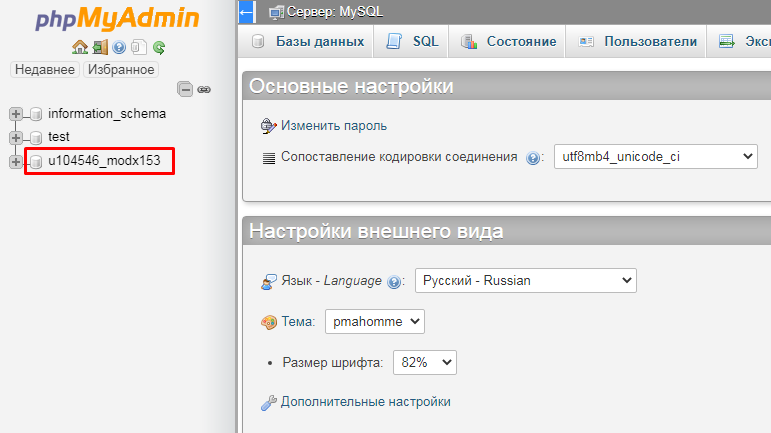
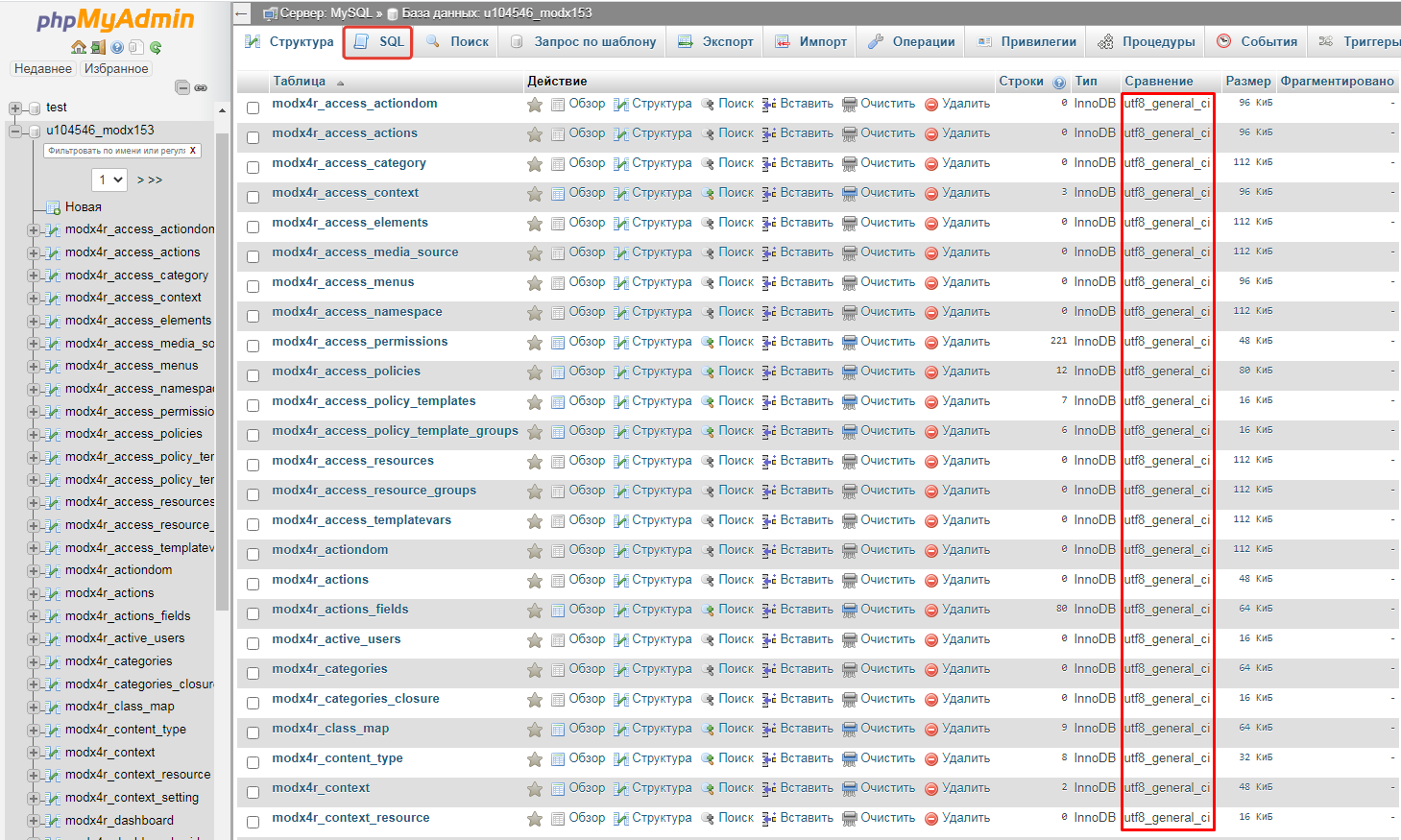
2. Откройте раздел SQL. (В столбце сравнение показана кодировка сопоставления)
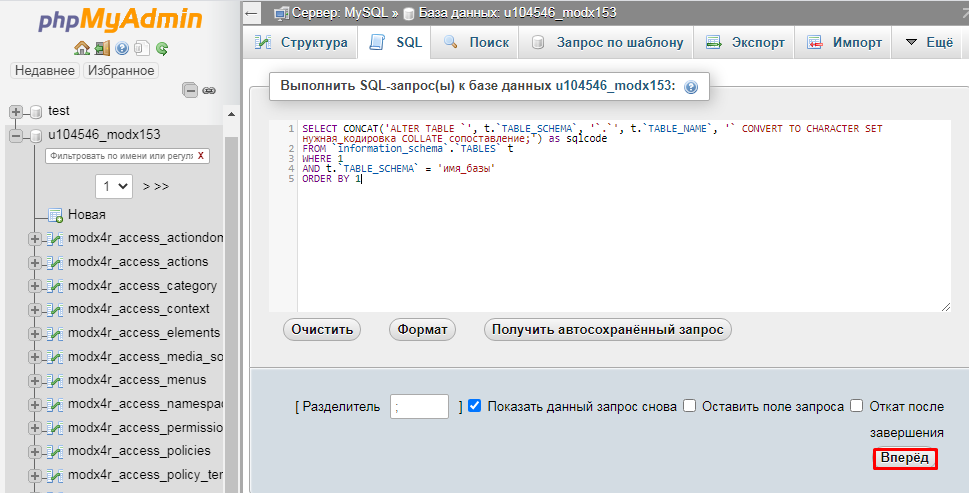
3. Скопируйте запрос, представленный ниже, вставьте его в окно SQL-запроса и измените «нужная_кодировка», «сопоставление» и «имя_базы» на кодировку, которая вам требуется, кодировку сопоставления и имя базы соответственно. Далее нажмите кнопку «Вперед».
SELECT CONCAT('ALTER TABLE `', t.`TABLE_SCHEMA`, '`.`', t.`TABLE_NAME`, '` CONVERT TO CHARACTER SET нужная_кодировка COLLATE сопоставление;') as sqlcode
 FROM `information_schema`.`TABLES` t
 WHERE 1
 AND t.`TABLE_SCHEMA` = 'имя_базы'
 ORDER BY 1
4. В ответе появится список запросов для смены кодировки каждой таблицы. Во вкладке параметры выберите пункт «Полные тексты» и нажмите «Вперед».
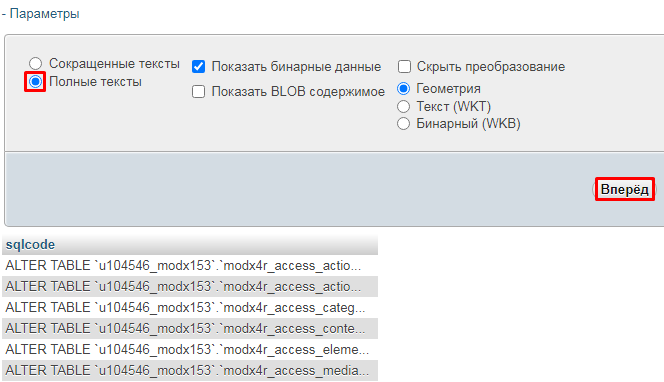
5. Скопируйте запросы, которые появились.
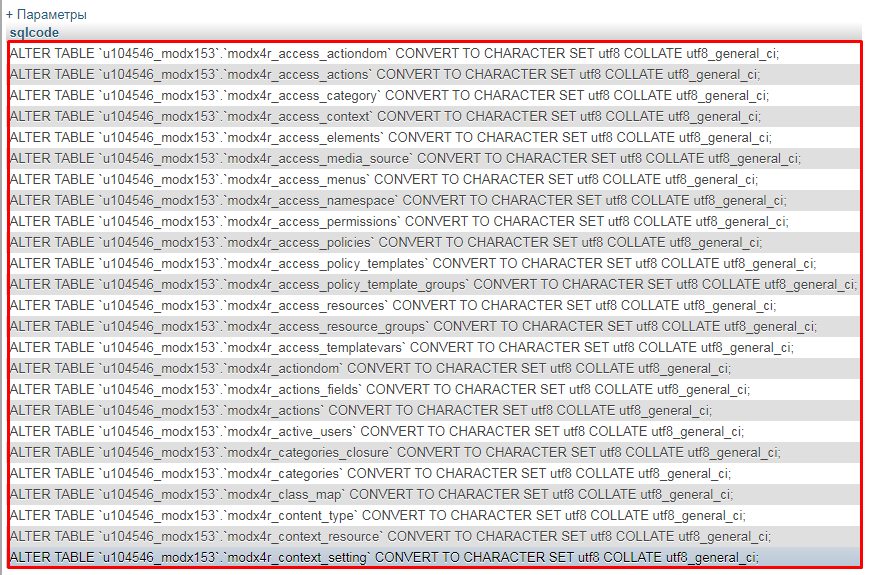
6. Вернитесь в раздел SQL и вставьте в окно запроса скопированные данные.
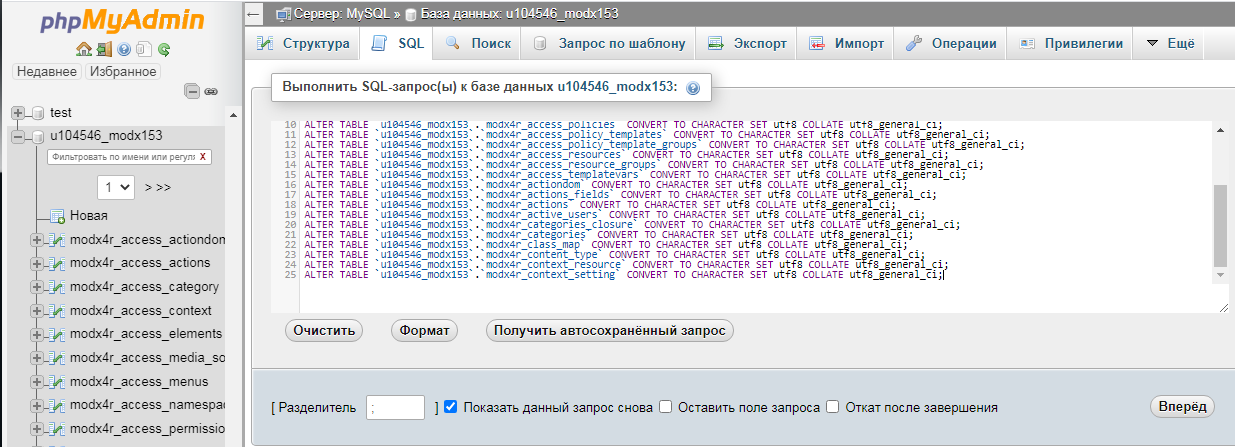
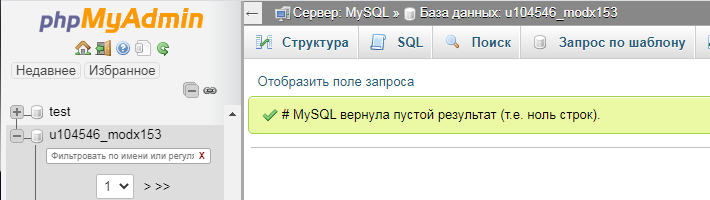
7. Нажмите кнопку «Вперед». Кодировка во всех таблицах базы данных успешно изменена.
Попросили тут перенести сайт на другой хостинг, а он, как оказалось, до сих пор жил в кодировке cp1251. Вроде ничего страшного — работает, но уж больно по колхозному это в наше время и давно пора перейти на UTF-8.
Перед любыми действиями с базой данных ОБЯЗАТЕЛЬНО СОЗДАЕМ РЕЗЕРВНУЮ КОПИЮ!
ALTER DATABASE имя_вашей_базы_данных charset=utf8;
Данный запрос конвертирует базу в указанную кодировку. Кроме этого потребуется конвертировать и сами таблицы. Запрос для конвертации таблицы базы данных:
ALTER TABLE `db_name`.`table_name` CONVERT TO CHARACTER SET utf8 COLLATE utf8_general_ci;
Конвертировать каждую из таблиц по отдельности подобным образом то ещё удовольствие, особенно при большом количестве. Однако можно не мучить себя подобным занятием, а создать последовательность команд посредством одного запроса:
SELECT CONCAT( 'ALTER TABLE `', t.`TABLE_SCHEMA` , '`.`', t.`TABLE_NAME` , '` CONVERT TO CHARACTER SET utf8 COLLATE utf8_general_ci;' ) AS sqlcode
FROM `information_schema`.`TABLES` t
WHERE 1
AND t.`TABLE_SCHEMA` = 'My_DB_for_convert'
ORDER BY 1
LIMIT 0 , 90
Остается только скопировать результаты и вставить их в форму нового SQL запроса.
Яндекс.Дзен
и узнавайте первыми о новых материалах, опубликованных на сайте.
For applications that store data using the default MySQL character
set and collation (latin1,
latin1_swedish_ci), no special configuration
should be needed. If applications require data storage using a
different character set or collation, you can configure character
set information several ways:
Specify character settings per database. For example,
applications that use one database might use the default of
latin1, whereas applications that use
another database might usesjis.Specify character settings at server startup. This causes the
server to use the given settings for all applications that do
not make other arrangements.Specify character settings at configuration time, if you build
MySQL from source. This causes the server to use the given
settings as the defaults for all applications, without having
to specify them at server startup.
When different applications require different character settings,
the per-database technique provides a good deal of flexibility. If
most or all applications use the same character set, specifying
character settings at server startup or configuration time may be
most convenient.
The examples shown here assume use of the utf8
character set and utf8_general_ci collation in
particular contexts as an alternative to the defaults of
latin1 and
latin1_swedish_ci.
Specify character settings per database.
To create a database such that its tables use a given
default character set and collation for data storage, use a
CREATE DATABASEstatement
like this:CREATE DATABASE mydb CHARACTER SET utf8 COLLATE utf8_general_ci;Tables created in the database use
utf8and
utf8_general_ciby default for any
character columns.Applications that use the database should also configure their
connection to the server each time they connect. This can be
done by executing aSET NAMES 'utf8'
statement after connecting. The statement can be used
regardless of connection method (the
client, PHP scripts, and so forth).In some cases, it may be possible to configure the connection
to use the desired character set some other way. For example,
to connect using , you can specify the
--default-character-set=utf8
command-line option to achieve the same effect asSET.
NAMES 'utf8'If you use
ALTER DATABASEto
change the database default character set or collation,
existing stored routines in the database that use those
defaults must be dropped and recreated so that they use the
new defaults. (In a stored routine, variables with character
data types use the database defaults if the character set or
collation are not specified explicitly. See
Section 13.1.16, “CREATE PROCEDURE and CREATE FUNCTION Statements”.)Specify character settings at server startup.
To select a character set and collation at server startup,
use the
--character-set-serverand
--collation-serveroptions.
For example, to specify the options in an option file,
include these lines:[mysqld] character-set-server=utf8 collation-server=utf8_general_ciThese settings apply server-wide and apply as the defaults for
databases created by any application, and for tables created
in those databases.Specify character settings at MySQL configuration time.
To select a character set and collation if you configure and
build MySQL from source, use the
DEFAULT_CHARSETand
DEFAULT_COLLATION
options:cmake . -DDEFAULT_CHARSET=utf8 \ -DDEFAULT_COLLATION=utf8_general_ciThe resulting server uses
utf8and
utf8_general_cias the default for
databases and tables and for client connections. It is
unnecessary to use
--character-set-serverand
--collation-serverto specify
those defaults at server startup. It is also unnecessary for
applications to configure their connection using
SET NAMESor equivalent after
they connect to the server.
Regardless of how you configure the MySQL character set for
application use, you must also consider the environment within
which those applications execute. For example, if you send
statements using UTF-8 text taken from a file that you create in
an editor, you should edit the file with the locale of your
environment set to UTF-8 so that the file encoding is correct and
so that the operating system handles it correctly. If you use the
client from within a terminal window, the
window must be configured to use UTF-8 or characters may not
display properly. For a script that executes in a Web environment,
the script must handle character encoding properly for its
interaction with the MySQL server, and it must generate pages that
correctly indicate the encoding so that browsers know how to
display the content of the pages. For example, you can include
this <meta> tag within your
<head> element:
<meta http-equiv="Content-Type" content="text/html; charset=utf-8" />