
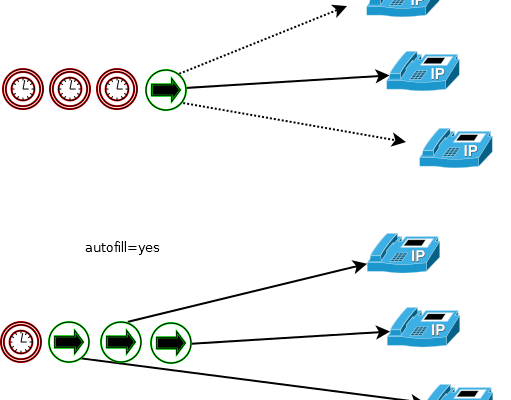
Organization of any Call-center begins with proper queuing. In the article, we will consider the configuration and examples of the necessary settings via the command line (editing configuration files). We will not consider setting up via FreePBX.
Set of basic commands
Creating and configuring a queue
Queue settings
Global Options for Queues
Adding Agents to a Queue
Static
dynamic
Agent Authentication
Dialplan for queue
Sending a call to a queue
Greetings
Call Priorities
System voices in Russian
- Basic commands for working with queues
- Creating and setting up a queue
- Queue Options
- Global Queue Options
- Adding operators to the queue (agents)
- Static agents
- Dynamic agents
- Agent Authentication
- Setting the dial plan (dialplan)
- Greeting
- Call Priorities
- Voice Russification
- Asterisk queue reload
- Queue configuration example
- Asterisk Queue Options
- Asterisk queue strategy
- Asterisk queue Timeout
- Asterisk queue variables
- Asterisk queue Members
Basic commands for working with queues
Commands are executed from the asterisk console:
1. View queues and their status:
support has 0 calls (max unlimited) in ‘ringall’ strategy (0s holdtime, 0s talktime), W:0, C:0, A:0, SL:0.0% within 0s
Members:
SIP/102 with penalty 1 (ringinuse enabled) (Unavailable) has taken no calls yet
SIP/101 with penalty 1 (ringinuse enabled) (Not in use) has taken no calls yet
No Callers
* in this example, 2 operators are registered in the queue and there are no calls (No Callers)
2. View a specific queue:
3. The number of calls in the queue.
We look with the above command:
If there are active calls, we will see something like:
4. Restart queue:
* The following options are available:
* if no queue name is specified, a restart is performed for all queues.
Creating and setting up a queue
The queue is created and configured in the configuration file queues.conf:
* In this example, we create a queue called support with the strategy ringall (call all agents at the same time).
* to create a queue, it is enough to define only the strategy (strategy).
Open the Asterisk console and re-read the configs:
Queue Options
Options that are used to configure the created queue:
Global Queue Options
List of global options:
Adding operators to the queue (agents)
Users who answer queue calls are called agents or operators. There are two types of agents — static and dynamic. The first ones are registered in the configuration file queues.conf, the second ones can join the queue, becoming an operator for a while.
Static agents
To create a static operator, open the queue configuration file:
In the queue settings add:
* In this example, we have added an operator to our queue. This is a sip agent named 101. 1 at the end is a penalty (used to set priority when using some strategies).
Reread all configuration files:
asterisk -x «core reload»
Dynamic agents
Dynamic agents can join the queue at any time by dialing a special combination of buttons on the telephone set. The server is configured in the dialplan configuration file:
* In this example, if the agent dials *999#, he joins the queue and can receive calls. When *888# is dialed, the agent leaves the queue.
* Verbose — output information to the console; Set — sets the value of the variable, in this example, MemberInfo; AddQueueMember/RemoveQueueMember — respectively, adds to the agent’s queue and removes from it; Playback — plays a voice signal; Hangup — gives a hangup signal.
Agent Authentication
1. Common password for all agents
You can make Asterisk require agents to enter a password to join the queue. To do this, we bring our dialplan to this form:
* where Authenticate is a password request, in this example, 1234.
2. Individual passwords for each agent
If you want each agent to enter their number and password before logging in, you need to use the VMAuthenticate (Mailbox Authentication) application. Let’s start the setup by editing the dialplan:
Add mailboxes:
* vmauth — context (we specified it in the dialplan); 1001/1002 — agent numbers; 1234/5678 — passwords.
To apply the settings, reread the dialplan:
asterisk -x «dialplan reload»
Setting the dial plan (dialplan)
So that when calling the number we need, the caller gets into our queue, add a rule in the dialplan:
* in this example, when calling the short number 111, we will hear a call for 2 seconds, signaling that we got through; after that the subscriber is directed to our support queue.
Greeting
In order to play the greeting, we edit our dialplan by adding the Playback function after Answer:
Call Priorities
We can create two incoming numbers, calls to which are processed by the same queue, but with different priorities. For example, extensions 120 and 130 — the dialplan looks like this:
* in this example, calls to 120 have higher priority; QUEUE_PRIO — in fact, it is a variable that stores the call priority value.
Voice Russification
By default, Asterisk may come with a set of English voice recordings. They are located in the /var/lib/asterisk/sounds/en directory. To add a Russian voice, open the list of language archives and copy the link to the archive with the desired language:
Using the link, download the archive:
Create a directory for our language:
Unpack the archive into the created folder:
tar -xvf asterisk-core-sounds-ru-wav-current.tar.gz -C /var/lib/asterisk/sounds/ru/
In the configuration file sip.conf add:
asterisk -x «sip reload»
If it is necessary to change the language only for a certain queue, you need to change the setting in the dialplan:
And restart dialplan:
Asterisk incoming call queue. Detailed description of the calling strategy. Penalty, timeout, member and all available options. Examples.
To create a static queue, it is enough to define its name in square brackets and the strategy for calling operators. The rest of the parameters will be assigned by default.
In the future, the name of the queue will be used to call it in the dialplan with the Queue command.
To apply and manage queue parameters, Asterisk console commands can be used:
Asterisk queue reload
In this case, the queue is empty, there is no one to receive calls. Agents receiving calls in the queue can be static, i.e. assigned in queue config – queues.conf:
Now the queue has members, users for handling incoming calls:
Alternatively, agents can be dynamic, i.e. be added using Asterisk interfaces — CLI, AMI or AGI.
Queue configuration example
Store each dynamic user in the internal Asterisk database (astdb) so that after a reboot, all users are restored from the queue entries in astdb. see also RemoveQueueMember Default:
persistentmembers = no
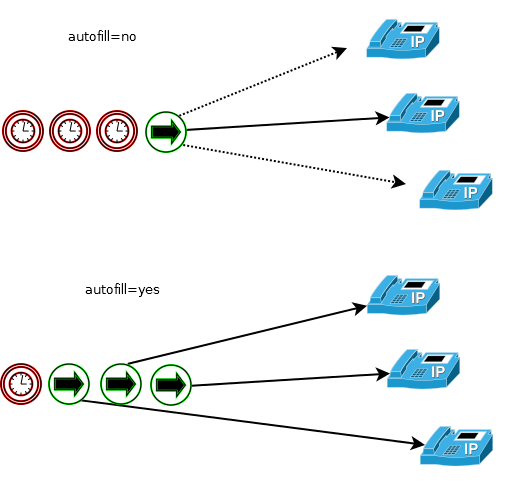
AutoFill Behavior
The old, default behavior of the queue (autofill=no) implied a serial connection type, in which the waiting subscriber connected to the user only from the first position in the queue. The new default behavior, (autofill=yes), allows a waiting subscriber to connect to a user (agent) of the queue, from any position, if there are free agents, without waiting for him to take the head position. This behavior allows faster processing of calls and is preferred.
autofill = yes
Monitor Type (Call Recorder)
The MixMonitor application records the conversation directly into one file, unlike the outdated Monitor, which separately records the input. ref. voice streams.
monitor-type = MixMonitor
UpdateCDR behavior
Write in the CDR field dstchannel the name of the agent, which you can set during login with the MemberName AddQueueMember parameter.
updatecdr = yes
Shared_lastcall (shared last call)
If the operator (agent) serves more than one queue, take into account parameters such as wrapuptime (pause after the end of the conversation during which the agent does not receive calls), for all calls, from all queues.
Negative_penalty_invalid
Treat agents with a negative penalty as inactive (do not issue calls to them).
negative_penalty_invalid = no
Log_membername_as_agent
Register agents with a name instead of an interface number. parameter for backwards compatibility, behavior as when working with the chan_agents module.
log_membername_as_agent = no
Asterisk Queue Options
Sets the Music on Hold (MOH) class used by this queue. This setting will take precedence over all but the channel variable set in the dialplan: Set(CHANNEL(musicclass)=whatever)
musicclass = default
Announcement
Message to the user serving the queue. The message may be played to the user (rather than the caller) before the caller accepts the call, for example to identify the queue from which the call came if the agent has more than one queue.
announce = file_to_play
Asterisk queue strategy
The most important parameter, indicates how calls will be distributed between agents:
So an operator with a penalty of 0 will have a metric ranging from 0 to 1000,
penalty shooter 1 from 0 to 2000,
and operator with a penalty of 2 will have a metric between 0 and 3000.
Note that when using this strategy, the operator’s penalty is not the same as
as with other queuing strategies.
It is used ONLY as a weighting factor for calculating the metric.
strategy = ringall
Servicelevel
Statistics parameter. Specifies the range from 0 to servicelevel= in seconds. The app_queue application will calculate the percentage of calls answered during the specified period. For example, if servicelevel=30 waited in the queue for no more than 30 seconds.
Below is an example where we see that 89.4% percent of calls in queue q1 were answered within 30 seconds (SL:89.4% within 30s).
Context
Indicates a dialplan context that a queued subscriber can enter by dialing a single digit in DTMF. The context must define an extension to handle this digit. For example, can be used for an interactive menu.
context = context_name
Penaltymembers limit
do not use a penalty if the number of operators serving the queue is less than or equal to that specified:
penaltymemberslimit = 5
Asterisk queue Timeout
A queue has two different «timeouts» associated with it. One of them is assigned in queue.conf. This timeout indicates how long, in seconds, the user’s phone will be called before it is considered that he did not answer. The second timeout is the application’s argument to Queue(). This is an absolute timeout after which the call exits the queue and moves to the next priority in the context. In some situations, these timeouts collide. For example, if the timeout in queue.conf is set to 5 seconds, retry = 4 seconds, and the Queue() application timeout is set to 10 seconds
the following will happen:
How long will the second operator be called? There is 1 second left until the Queue() application’s absolute timeout expires. Will the second statement be called for 1 second or 5 as specified in the queue.conf timeout?
The timeoutpriority parameter is supposed to resolve this collision: if timeoutpriority=conf, then the second operator will be called within 5 seconds. If timeoutpriority=app, then within 1 second.
There are some exceptions to the above rules:
suppose timeoutpriority=app, in queues.conf the timeout is 0, and the Queue application argument is set to 10 seconds.
The timeoutpriority is then ignored and the application timeout is used as the timeout for calling the queues/conf statements.
Conversely, if no application timeout is set, then timeoutpriority is ignored and timeout conf. the queues.conf file is always used.
Despite the fact that timeoutpriority=conf the timeout of the queues.conf configuration file takes precedence over the application timeout,
if timeout conf. file is 0, each queue member will be called for an indefinite time, and the application timeout will be checked after these attempts.
Default: timeoutpriority=app
Weight
The higher the weight of the queue, the higher the priority for calling an operator serving more than one queue.
by default 0
Wrapuptime
After a successful call is completed, the agent rest time before being able to receive calls again. by default 0
Overrides the global autofill setting discussed above on a per-queue basis.
Autopause
Pause the agent if he did not answer the call. cm. also PauseQueueMember
Autopausedelay
Postpone agent pause for the amount of time since the last failed call ended.
Autopausebusy
Whether or not to pause the operator if he is busy (BUSY).
Autopauseunavail
Whether or not to pause the operator if it is unavailable (UNAVAILABEL).
Maxlen
The maximum number of people waiting in line. If exceeded, subsequent calls will be rejected.
0 — unlimited.
Asterisk queue variables
Note for the queue parameters discussed below – setinterfacevar, setqueueentryvar, setqueuevar. If a member channel is defined as Local, then it must be optimized with the /n option to set variables. For example:
If setinterfacevar=yes, then the following variables will be assigned in the caller and queue operator channels:
Setqueueentryvar
If setqueueentryvar=yes, then the following variables will be assigned in the caller and queue operator channels:
Setqueuevar
If setqueuevar=yes, then the following variables will be assigned in the caller and queue operator channels, on connection, or when the caller leaves the queue:
Membermacro
If set, execute Macro when the operator is connected.
This option can be overridden by the macro parameter of the Queue() application
Membergosub
If set, execute GoSub when connected to an operator.
This option can be overridden by the gosub parameter of the Queue() application
Announce-frequency
How often to announce the position in the queue and the average waiting time. If 0 then do not announce. Note: this parameter is ignored when changing the subscriber’s position in the queue (see min-announce-frequency)
announce-frequency = 90
Min-announce-frequency
The minimum interval between the moment of transition to the next position and the announcement of the average holding time. This is useful for avoiding constant announcements when the subscriber’s queue position changes frequently. i.e., if the position in the queue has changed, then do not notify, even if the announce-frequency time has come. (See announce-frequency)
min-announce-frequency = 15
Periodic-announce-frequency
How often to do periodic-announce.
Random-periodic-announce
Produce periodic alerts randomly? The default is no.
Relative-periodic-announce
Count the time for periodic-announce from the end of the previous announcement, not from its start. off by default.
Announce-holdtime
Include average waiting time announcement in queue position announcement?
You can specify yes, no, or once.
Announce-position
Announce a position in the queue?
Possible values are «yes», «no», «limit», or «more».
i.e., if announce-position-limit=5 announce that more than 5 subscribers are waiting in the queue.
announce-position = yes
Announce-to-first-user
If enabled, ads will be played first in the queue. This can lead to a situation where the agent is ready to accept the call, but the connection is delayed due to the announcement and will result in queuing delays. off by default.
Announce-position-limit
If «limit» or «more» is assigned to announce-position, this parameter will be enabled.
announce-position-limit = 5
Announce-round-seconds
Round ad timings to given value if not = 0 Possible values are 0, 5, 10, 15, 20, and 30.
announce-round-seconds = 10
Audio files used for announcements
If no others are specified, the files listed below are used:
queue-youarenext = queue-youarenext ;(«You are now first in line.»)
queue-thereare = queue-thereare ; («There are»)
queue-callswaiting = queue-callswaiting ; («calls waiting.»)
queue-holdtime = queue-holdtime ; («The current est. holdtime is»)
queue-minute = queue-minute ; («minute.»)
queue-minutes = queue-minutes ; («minutes.»)
queue-seconds = queue-seconds ; («seconds.»)
queue-thankyou = queue-thankyou ; («Thank you for your patience.»)
queue-reporthold = queue-reporthold ; («Hold time»)
periodic-announce = queue-periodic-announce ; («All reps busy / wait for next»)
You can set multiple sound files for the main announcement separated by commas. The files will be played in the order they are listed.
For example:
periodic-announce = queue-periodic-announce,your-call-is-important,please-wait
Monitor format
To enable call recording, you need to set «monitor-format»,
if monitor-format is not set, call recording is considered disabled.
Calls will only be recorded from the moment the operator picks up the handset.
Queue Empty Options
Asterisk queue parameters «joinempty» and «leavewhenempty» reg
comment on the conditions under which the subscriber can enter the queue and leave it, respectively.
The «joinempty» and «leavewhenempty» parameters can take multiple values separated by commas.
Below is a list of factors affecting these parameters:
Example, do not connect to the queue if all agents have one of the following statuses:
joinempty = paused,inuse,invalid
Leave the queue if all agents have one of the specified statuses:
leavewhenempty = inuse,ringing
; Deprecated values, may be specified for backwards compatibility:
Reportholdtime
If you need to notify the operator about how long the subscriber has been waiting in the queue.
reportholdtime = no
Ringinuse
To avoid calling an agent whose interface is in ‘in use’ state, set = no. In addition to the overall value of the queue, it is possible to set this parameter for individual queue users via the QUEUE_MEMBER command, the ‘ringinuse’ field realtime users and CLI/AMI:
SIP/4887 (ringinuse disabled) (dynamic) (Not in use)
SIP/4887 (ringinuse enabled) (dynamic) (Not in use)
only SIP and PJSIP channel drivers currently support ‘in use’ status
ringinuse = no
Memberdelay
The parameter sets the delay time between the moment when the agent answers the call and connects him to the caller.
memberdelay = 0
Timeoutrestart
If the «timeoutrestart» parameter is set to yes, then the timeout value for the agent will be reset if a BUSY or CONGESTION signal is received from it. This is useful when an agent has the ability to mark a call by rejecting it, or by performing some action that has a similar effect. (It was found that if an agent’s call ends with a NOANSWER (ring, no-answer) status, this also causes the call to be sent to the next agent in the roundrobin queue).
timeoutrestart = no
Defaultrule
assign default rules. The configuration is in queuerules.conf
defaultrule = myrule
Asterisk queue Members
Each queue user is listed on a separate line
as technology/set string. A user is a queue operator.
An additional penalty parameter can be given after the comma.
Each Asterisk queue operator has a penalty parameter.
Penalty can be defined in queue user settings:
or when adding a dynamic agent:
This parameter determines the priority for making a call to the operator, the lower the penalty, the higher the priority when choosing an operator for the call.
If penalty is not set, then default = 0
Let’s assume that the queue is serviced by 3 operators with a penalty — 0.1 and 2, respectively.
The operator with penalty = 0 will be called first, and only if it is not available, the operator with penalty = 1 and so on.
Operator penalty can be changed dynamically, for example via CLI:
or via AMI Actions QueuePenalty.
Users with a higher penalty value have a lower call priority.
A name is assigned after the second comma.
The use of the name can be convenient for presentation in queue logs.
Different interfaces can use the same name.
An additional description of the interface is indicated after the third comma.
App_queue notifications will be sent to this interface,
but the interface specified first will always be used for the call.
