- Osclass by Mindstellar
- A free and open source script by Mindstellar
- What is Osclass?
- How to install Osclass?
- How to get the latest version?
- Run osclass locally using Docker
- How to get the latest version?
- Run osclass locally using Docker
- Services exposed outside your environment
- Hosts for osclass docker environment
- Docker compose cheatsheet
- Pull Request
- Support
- Installation Guide
- Project info
- Services exposed outside your environment
- Hosts for osclass docker environment
- Docker compose cheatsheet
- Pull Request
- Support
- Installation Guide
- Project info
- Install
- How to install Osclass;
- How to get the latest version?
- Osclass Installation
- 1. Download Osclass
- 2. Start XAMPP
- 3. Begin Installation
- 4. Enter database information
- 5. Enter Admin and contact details
- Summary
Osclass by Mindstellar
\n
A free and open source script by Mindstellar
\n
What is Osclass?
\n\n
How to install Osclass?
\n\n
\n
- \n
- Download the latest zip package of Osclass from GitHub Release
and\nunpack it in your web-server root, i.e.public_html
directory. - Execute the Osclass installation script by accessing index.php
oc-includes/osclass/install.php
from your browser:\n- \n
- If you’ve installed it in the domain’s root directory, you’ll have to go to:
http://example.com/index.php
or\ndirectly to http://example.com/oc-includes/osclass/install.php
- If you’ve installed it in a subdirectory inside the domain, classifieds, for example, go to:
http://example.com/classifieds/index.php
or directly tohttp://example.com/classifieds/oc-includes/osclass/install.php
\nThis will lead you to osclass inbuilt installer.
\n
\n
\n
- If you’ve installed it in the domain’s root directory, you’ll have to go to:
- Follow Osclass installer instructions:\n\n
\n
\n
\n
\n
How to get the latest version?
\n
Checkout our GitHub Release
section to get latest version of osclass.
\n
Do not use master branch for your deployment, it may include untested code. Only use zip file provided in our release section.
\n
Run osclass locally using Docker
\n
First Clone the repository and the submodules.
\n
\n Osclass by Mindstellar
\n A free and open source script by Mindstellar
\n What is Osclass?
\n\n How to install Osclass?
\n\n
\n\n- Download the latest zip package of Osclass from GitHub Release and\nunpack it in your web-server root, i.e.
public_html directory. \n- Execute the Osclass installation script by accessing index.php
oc-includes/osclass/install.php from your browser:\n\n- If you’ve installed it in the domain’s root directory, you’ll have to go to:
http://example.com/index.php or\ndirectly to http://example.com/oc-includes/osclass/install.php \n - If you’ve installed it in a subdirectory inside the domain, classifieds, for example, go to:
http://example.com/classifieds/index.php or directly to http://example.com/classifieds/oc-includes/osclass/install.php
\nThis will lead you to osclass inbuilt installer.
\n
\n \n- Follow Osclass installer instructions:\n\n
\n
\n How to get the latest version?
\n Checkout our GitHub Release section to get latest version of osclass.
\n Do not use master branch for your deployment, it may include untested code. Only use zip file provided in our release section.
\n Run osclass locally using Docker
\nFirst Clone the repository and the submodules.
\n " git="" clone="" --recursive="" git@github.com:mindstellar="" osclass.git\"=""> (♀5gt; git clone --recursive git@github.com:mindstellar/Osclass.git\n)gt; git clone --recursive git@github.com:mindstellar/Osclass.git\ngt; git clone --recursive git@github.com:mindstellar/Osclass.git\n
gt; git clone --recursive git@github.com:mindstellar/Osclass.git\n
gt; git clone --recursive git@github.com:mindstellar/Osclass.git\n
\n\n\n
Once you're done, simply cd
to Osclass directory and run docker-compose up -d
. This will initialise and start all the containers, then leave them running in the background.
\n
\n- \n
Services exposed outside your environment
\n
You can access your application via localhost
, if you're running the containers directly. nginx and mailhog both\nrespond to any hostname, in case you want to add your own hostname on your /etc/hosts
\n\n\n\n\n\n\n\n\n\n\n\n\n\n\n\n\n\n\n\n\n\n\n\n\n\n\n
\n
- \n
Hosts for osclass docker environment
\n
You'll need to configure osclass to use enabled services:
\n\n\n\n\n\n\n\n\n\n\n\n\n\n\n\n\n\n\n\n\n\n\n\n\n\n\n\n\n\n\n\n
\n
- \n
Docker compose cheatsheet
\n
Note:
you need to cd first to where your docker-compose.yml file lives.
\n
\n- Start containers in the background:
docker-compose up -d \n
- Start containers on the foreground:
docker-compose up
. You will see a stream of logs for every container\nrunning. \n
- Stop containers:
docker-compose stop \n
- Kill containers:
docker-compose kill \n
- View container logs:
docker-compose logs \n
- Execute command inside of container:
docker-compose exec SERVICE_NAME COMMAND
where COMMAND
is whatever you\nwant to run. Examples: \n
- Shell into the PHP container,
docker-compose exec php-fpm bash \n
- Open a mysql shell,
docker-compose exec mysql mysql -uroot -pCHOSEN_ROOT_PASSWORD \n
\n
\n
\n
Pull Request
\n
Want to help create a pull request from you clone, just make sure of few things
\n
\n- Never target master-branch
\n
- Target develop branch if you want to merge your fixes.
\n
- Request a feature branch if your pull request make major changes in our project or if you really need one.
\n
- Create a new issue before making any pull request.
\n
\n
Support
\n
For any support related query, please visit our official support forum.
\n\n
Installation Guide
\n\n
Project info
\n\n
gt; git clone --recursive git@github.com:mindstellar/Osclass.git\n
\n\n\n
Once you’re done, simply cd to Osclass directory and run docker-compose up -d. This will initialise and start all the containers, then leave them running in the background.
\n
- \n
- \n
Services exposed outside your environment
\n
You can access your application via
localhost, if you’re running the containers directly. nginx and mailhog both\nrespond to any hostname, in case you want to add your own hostname on your/etc/hosts\n\n\n\n\n\n\n\n\n\n\n\n\n\n\n\n\n\n\n\n\n\n\n\n\n\n\n
- \n
Hosts for osclass docker environment
\n
You’ll need to configure osclass to use enabled services:
\n\n\n\n\n\n\n\n\n\n\n\n\n\n\n\n\n\n\n\n\n\n\n\n\n\n\n\n\n\n\n\n
- \n
Docker compose cheatsheet
\n
Note: you need to cd first to where your docker-compose.yml file lives.
\n
- \n
- Start containers in the background:
docker-compose up -d - Start containers on the foreground:
docker-compose up. You will see a stream of logs for every container\nrunning. - Stop containers:
docker-compose stop - Kill containers:
docker-compose kill - View container logs:
docker-compose logs - Execute command inside of container:
docker-compose exec SERVICE_NAME COMMANDwhereCOMMANDis whatever you\nwant to run. Examples: - Shell into the PHP container,
docker-compose exec php-fpm bash - Open a mysql shell,
docker-compose exec mysql mysql -uroot -pCHOSEN_ROOT_PASSWORD
\n
\n
\n
\n
\n
\n
\n
\n
\n
- Start containers in the background:
\n
\n
\n
\n
Pull Request
\n
Want to help create a pull request from you clone, just make sure of few things
\n
- \n
- Never target master-branch
- Target develop branch if you want to merge your fixes.
- Request a feature branch if your pull request make major changes in our project or if you really need one.
- Create a new issue before making any pull request.
\n
\n
\n
\n
\n
Support
\n
For any support related query, please visit our official support forum.
\n\n
Installation Guide
\n\n
Project info
\n\n
Install
\n
How to install Osclass;
\n\n
\n
- \n
- Download the latest zip package of Osclass from GitHub Release and unpack it in your web-server root, i.e?
public_htmldirectory. - Execute the Osclass installation script by accessing index.php
oc-includes/osclass/install.phpfrom your browser:\n- \n
- If you’ve installed it in the domain’s root directory, you’ll have to go to:
http://example.com/index.phpor directly to http://example.com/oc-includes/osclass/install.php - If you’ve installed it in a subdirectory inside the domain, classifieds, for example, go to:
http://example.com/classifieds/index.phpor directly tohttp://example.com/classifieds/oc-includes/osclass/install.php
\nThis will lead you to osclass inbuilt installer.
\n
\n
\n
- If you’ve installed it in the domain’s root directory, you’ll have to go to:
- Follow Osclass installer instructions:\n
- \n
- \n\n

\nMake sure the server has the required permissions to write in the files and directories specified. This will allow you to create a basic configuration file as well as upload images, documents, etc.\n
- \n\n

\nAdd your access details to the database. If you haven’t created it yet, the installer will ask for another account with permissions that will allow to do it for you.\n
- \n\n

\nAdd the basic installation details and select your classifieds site’s country.\n
- \n\n
\n
- \n\n
\n
\n
\n
\n
\n
\n
- \n\n
\n
\n
\n
\n
How to get the latest version?
\n
Checkout our GitHub Release section to get latest version of osclass.
\n
Do not use master branch for your deployment, it may include untested code. Only use zip file provided in our release section.
\n

Тема: Osclass установка на хостинг — инструкция (Прочитано 55278 раз)
« Последнее редактирование: 09 Апрель 2021, 15:46:31 от Dis
»
Доработки любой сложности.
Задание присылайте в личку.
Добрый день! Почему я не могу нажать кнопку «Next»?
WEb Title заполните, это название доски, оно редактируемое, потом в админке сможете его менять как угодно.
Доработки любой сложности.
Задание присылайте в личку.
Добрый день! Почему я не могу нажать кнопку «Next»?
В вк скинул тебе
Ребята помогите с установкой на хостинг
Ребята помогите с установкой на хостинг
А конкретней ? В чём проблема ?
Доработки любой сложности.
Задание присылайте в личку.
Guys help with installation on hosting
And more specifically? What is the problem ?
It is installed on the local without any problems, but do you need to register something on the hosting or write permissions?
It is installed on the local network without any problems, but do you need to register something on the hosting or write permissions?
Folders 755, files 644.
Improvements of any complexity.
Send the task in a personal.
It is installed on the local network without any problems, but do you need to register something on the hosting or write permissions?
Folders 755, files 644.
including subfolders or just folders? And how to start the installation?
« Last Edit: February 23, 2015, 10:48:53 AM by UzAirways
»
including sub folders or just folders? And how to start the installation?
Including subfolders.
p.3 at the beginning of the topic.
Improvements of any complexity.
Send the task in a personal.
When installing it says:
Osclass »Error
There doesn’t seem to be a config.php file. Osclass is not installed. Need more help?
When installing it says:
Osclass »Error
There doesn’t seem to be a config.php file. Osclass is not installed. Need more help?
click continue and enter the required data.
Improvements of any complexity.
Send the task in a personal.
« Last Edit: February 23, 2015, 04:10:10 PM by UzAirways
»
I sent a message, please help. All sorts of mistakes(
Please write what rights should be set? and which folders?
For example:
uploads:
downloads:
languages:
Yes, I already wrote everything.
I don’t need to write to me about the remote installation of your board on Teamview.
Installing Osclass couldn’t be easier.
It’s all in the first post.
I am not a clairvoyant. A message like I have all sorts of errors pouring in, will not lead to anything.
Write specific problems, what kind of errors? What’s in the logs?
Improvements of any complexity.
Send the task in a personal.
« Last Edit: February 23, 2015, 04:37:14 PM by UzAirways
»
Topic: Osclass installation on hosting — instructions (Read 55277 times)
Requires write access to these folders:
uploads
downloads
languages
which should be shown? and turn off subdirectories on all folders?
755 including all subdirectories.
Improvements of any complexity.
Send the task in a personal.
Requires write access to these folders:
uploads
downloads
languages
which should be shown? and turn off subdirectories on all folders?755, including all subdirectories.
Screenshot sent to you in PM
Maybe the script 3.5.3 is glitched (
« Last edit: February 23, 2015, 04:55:18 PM by UzAirways
»
Requires write access to these folders:
uploads
downloads
languages
which should be shown? and turn off subdirectories on all folders?755, including all subdirectories.
Screenshot sent to you in PM
Maybe script 3.5.3 is glitched(
Great script! Understand the rights on your hosting!
Improvements of any complexity.
Send the task in a personal.
Improvements of any complexity.
Send the task in a personal.
installed, do you need to delete anything? Folders or files?
set whether to delete anything? Folders or files?
No need to delete anything.
Improvements of any complexity.
Send the task in a personal.
installed, installed, played with Russification, demolished. I try to reinstall from the same archive, with the same parameters I get:
Osclass » Error There doesn’t seem to be a config.php file. Osclass isn’t installed. Need more help?
Maybe there is protection against repeated installations?
« Last Edit: March 18, 2015, 11:01:44 PM by allexx
»
installed, installed, played with Russification, demolished. I try to reinstall from the same archive, with the same parameters I get:
Osclass » Error There doesn’t seem to be a config.php file. Osclass isn’t installed. Need more help?Maybe there is protection against repeated installations?
There is no protection against reinstallation. Osclass can’t create config.php in your case, maybe it’s a permissions issue. When you install Osclass, it checks if you have the necessary permissions and alerts you if there are problems.
Improvements of any complexity.
Send the task in a personal.
Unable to install, gives an error
Osclass » Error
Osclass database server is not available
What could be the problem?
Hello, tell me about the installation.
Installed Osclass files on the hosting, created a user and a database on the hosting
I go to http://site.ru/oc-includes/osclass/install.php
It’s all right! All system requirements met:
all requirements are marked with green checkmarks.
Then I enter information about the database:
Database name: host1371717_osclass
Username: host1371717_3333
Then an error occurs:
Osclass » Error
Osclass database server is not available.
What could be the problem.
With access to the database. Your data is entered incorrectly.
Improvements of any complexity.
Send the task in a personal.
How to solve the problem. I read the forum and didn’t find anything.
Thank you in advance for your reply.
« Last Edit: Oct 17, 2015 01:31:26 PM by Maxhat
»

Subject: Installation (Read 942 times)
Error «Osclass Evolution»
There doesn’t seem to be a config.php file there. osclass is not installed.
Such a message immediately gives out and that’s it, the installation does not go further
Need to press — Install and follow instructions
installation takes place on a local server
when accessing writes http://localhost/index.php
:
Osclass Evolution » Error
There doesn’t seem to be a config.php file. Osclass isn’t installed.
I press install and see on: http://localhost/oc-includes/osclass/install.php
Page unavailable
The localhost site cannot process this request yet.
HTTP ERROR 500
SERVER_SOFTWARE Apache/2.4.48 (Win64) PHP/8.0.10
GetText Support enabled
Client API library version mysqlnd 8.0.10
installation takes place on a local server
when accessed writes http://localhost/index.php
:
Osclass Evolution » Error
There doesn’t seem to be a config.php file. Osclass isn’t installed.
I press install and see on: http://localhost/oc-includes/osclass/install.php
Page unavailable
The localhost site cannot process this request yet.
HTTP ERROR 500SERVER_SOFTWARE Apache/2.4.48 (Win64) PHP/8.0.10
GetText Support enabled
Client API library version mysqlnd 8.0.10
Look at the error log, look for the cause of the 500 error.
OSCLASS is a free, open-source classified script that helps you to create your own site with real estate ads, job listings, car classifieds, rentals
, or just about anything you can imagine.
Built using MySQL and PHP technology, but you don’t need to worry as Osclass is fully configurable and has good themes and plugins. Script and basic themes, and plugins used to be free, but it seems they discontinued that. You need to purchase themes
and plugins
.
Below are some of the features of this script.
- Payment options
- Worldwide locations
- Watermark
- Alerts
- Custom Fields
- Static pages
- Add categories and subcategories
- Add your banners
- Google Maps integrated
- Publish video ads
- Choose currency
- Responsive for mobiles and tablets
Osclass Installation
Below are the step-by-step instructions to install Osclass on localhost. We are using XAMPP
, you can use any other Apache distribution like WAMP
.
This tutorial assumes a basic working knowledge of the Windows Operating system.
- Microsoft Windows 8.1/10 32/64 Bit Operating System
- XAMPP v3.2.2 – Free Apache, MySQL, and PHP Distribution
- Osclass v3.7.4
1. Download Osclass
Click this link
download Osclass.
At the time of writing this article, the version is Osclass v3.7.4.
Below are the minimum requirements.
- PHP version: 5.6 or newer
- MySQL database (or access to create one)
- MySQLi module for PHP
- GD module for PHP
2. Start XAMPP
Start Apache and MySQL Service. This is the pre-requisite before starting the installation. Make sure PID(s) and Port(s) are populated and the module name background turns green.
3. Begin Installation
Create folder classifieds in C:\xampp\htdocs\
and extract the downloaded file there. You should find below the file structure under C:\xampp\htdocs\classifieds\
folder.
- oc-admin
- oc-content
- oc-include
- CHANGELOG.txt
- config-sample.php
- favicon.ico
- index.php
- licenses.txt
- oc-load.php
Open a web browser and enter the URL http://localhost/classifieds/index.php
. This starts the installation.
If you get an error “There doesn’t seem to be config.php file. Osclass isn’t installed. Need more help?”, then enter the URL http://localhost/classifieds/oc-includes/osclass/install.php
.
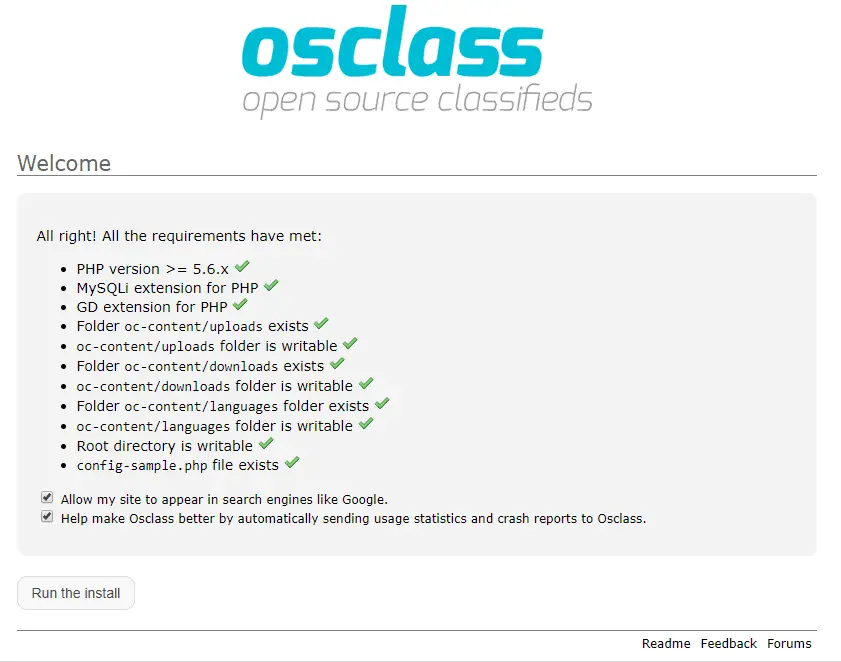
The installer does a quick requirement check. If all the requirements have been met, Click the Run the Install
button.
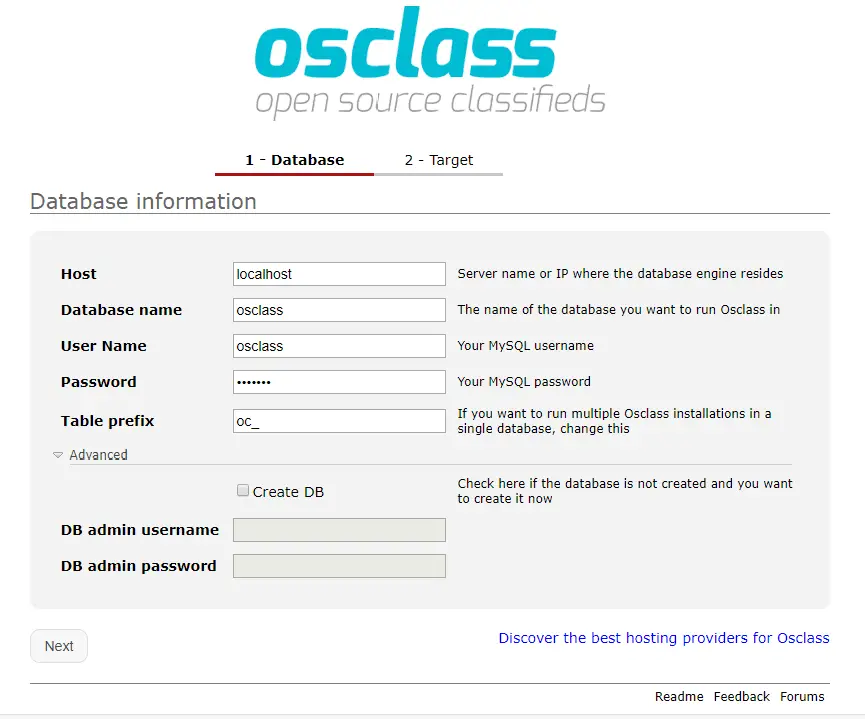
4. Enter database information
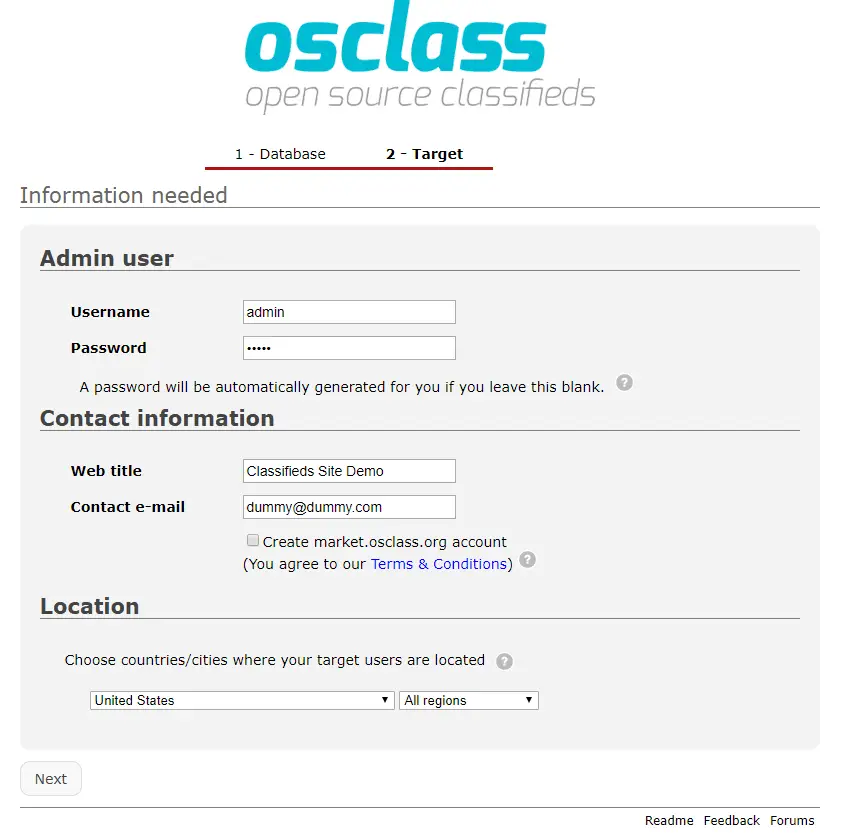
5. Enter Admin and contact details
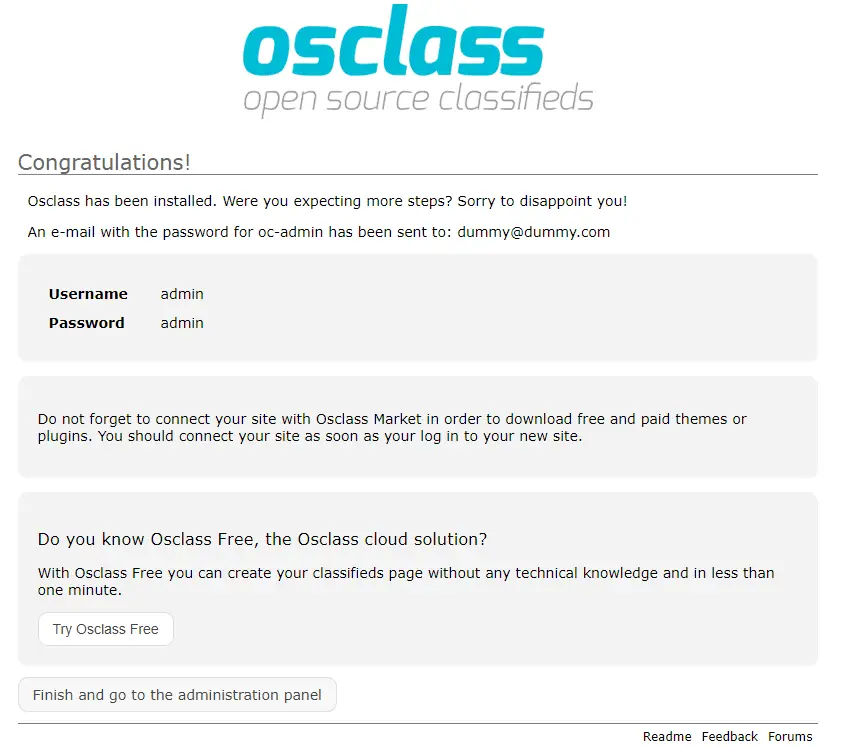
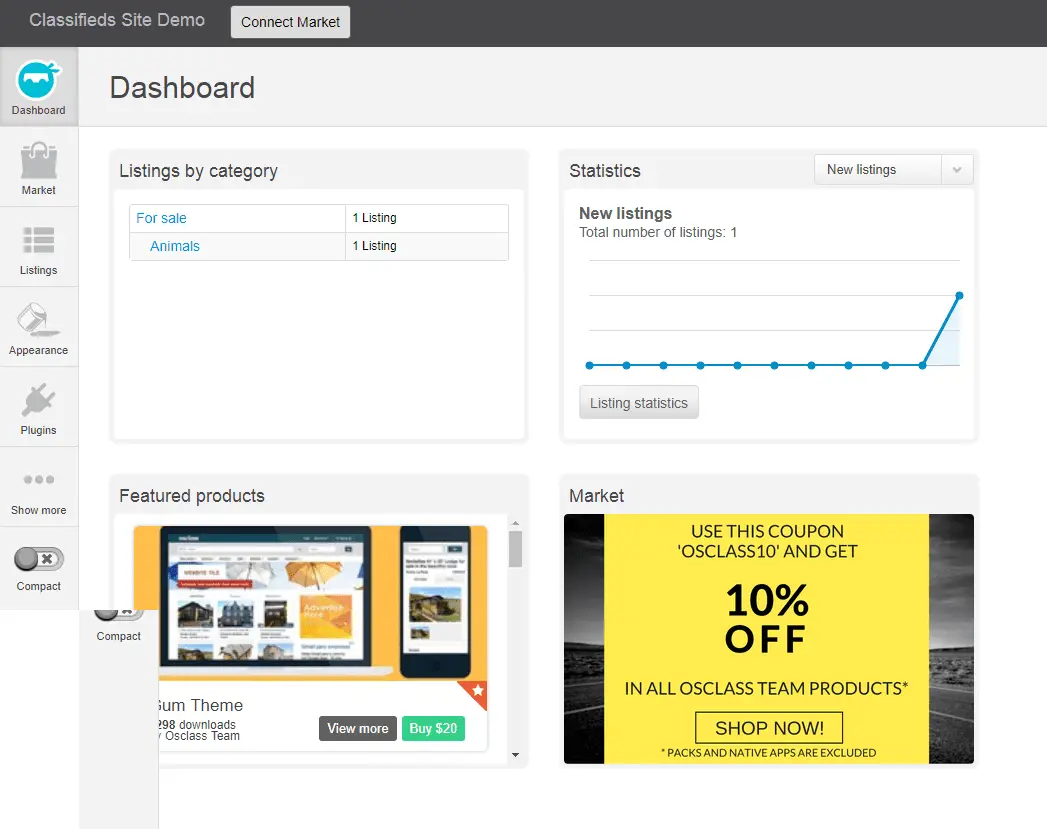
Click on Classifieds Site Demo link on the upper left corner to open your site. Here you go, this is your ad listing site with the default setup.
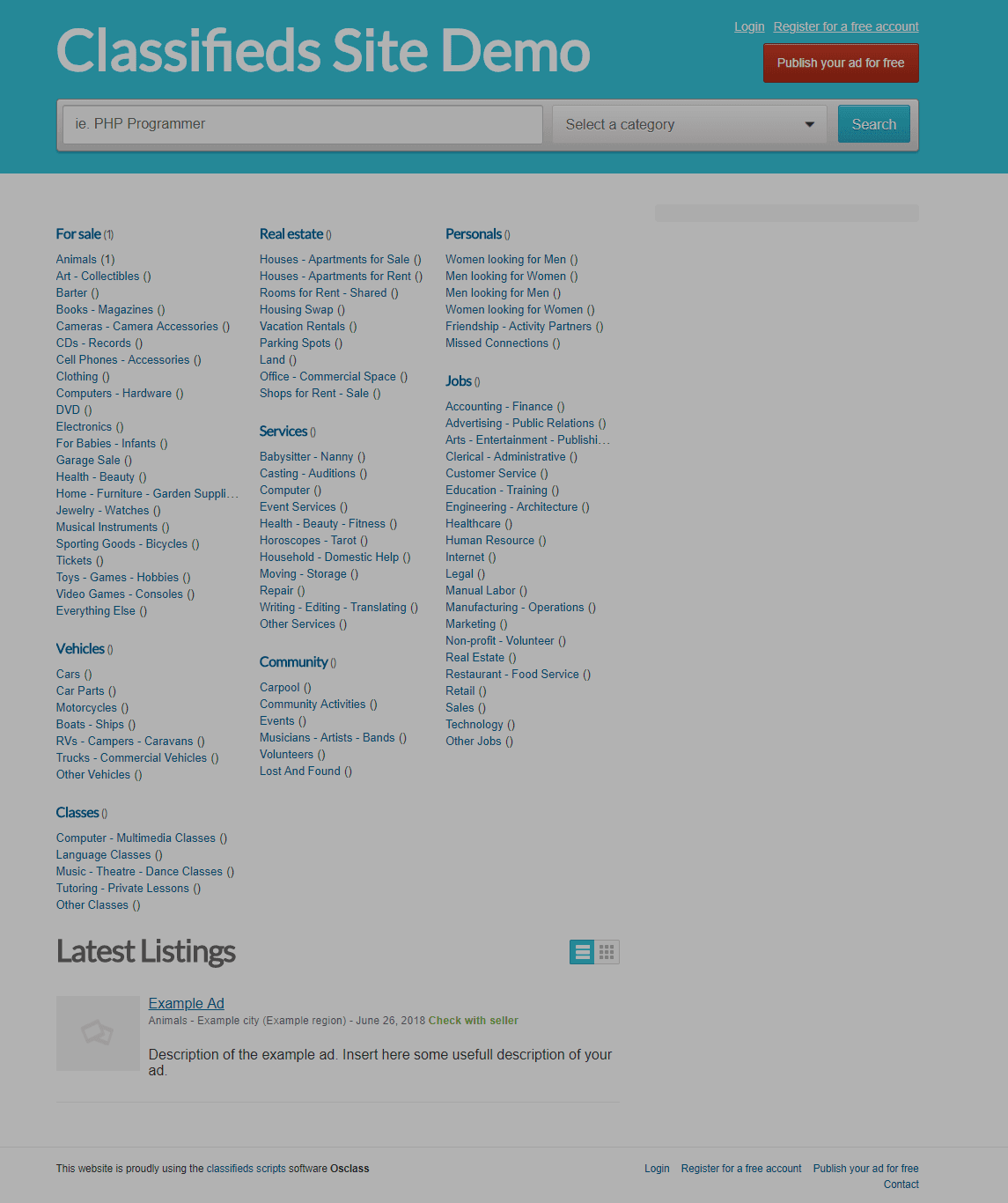
Go ahead and play with Osclass. Let me know if you face any issues and need help.
Summary
Osclass is one of the budget scripts available to start your real estate, job website. Go ahead download and install it