
More SSD boxes. You liked the tariffs on SSD drives, so we are reopening the opportunity to create such boxes. The read and write speeds of high-performance SSDs are only slightly inferior to NVMe, and the price will pleasantly surprise you. Create boxes in the Sprintbox Control Panel.
Rubles to the left, sprintcoins to the right. We made a small but convenient change to the appearance of the account balance. Now you can immediately see how much real money is in the account and how many sprintcoins that can be spent on our services.
Moving webmail to sprintmail. Do not be alarmed if, when you enter webmail.sprinthost.ru, you will be redirected to sprintmail.ru. We’ve brought some branding to our email service. Transfer mail to us, it will work fine on our hosting. In addition, we are now actively working on new features for Mail.
Updates in tickets in PU. Improved the section with tickets and made the display of pictures very convenient. Now you do not need to download anything, you can see the type of data being loaded and the images themselves. In addition to documents, you can send us memes in tickets, we will gladly respond in kind!
We are looking for a parrot. We have launched an annual drawing competition. This time we want to know what the Sprintsite mascot looks like and what its name is. All details on the competition are in the VK group. We look forward to your drawings!
Keeping you updated!
Domain SupersaleFrom May 15 to May 24, inclusive, register domains in the . EN/. RF from the registrar Sprintnames at an incredible price of 49 ₽
How to register a domain for 49 ₽:
Top up the balance for the required amount
Select a person to register or create a new one in the Persons section
Go to the Pick a new domain section of the Control Panel
Enter a name, tick Register this domain and click Add site
Pay for registration. Your domain!
The number of domains is not limited. The more of them, the cheaper the renewal — from 288 ₽ and below. Register domains faster at a bargain price
This media is not supported in your browserVIEW IN TELEGRAM
🌐
Birthday of the Internet On May 17, 1991, the World Wide Web was woven for the first time, without which it is now impossible to imagine your life. Thanks to Tim Berners-Lee that now we can create websites, earn money online, communicate in social networks and send memes to each other
In honor of such an event, keep the promo code for 20% in Sprintshop — WWWDAY, and when ordering from 2,000 ₽, delivery is free. The promotion is valid
Hooray, we found a parrot!
We felt like we were in the jungle when so many parrots came flying towards us — a whole riot of colors and colors!
Of all the birds, we chose a couple of the brightest representatives and one unique and inimitable — Krudo. It is he who will become the mascot of the new Sprintsite service.
All the results of the competition can be seen in the VK post.
New images for boxes 🔥
Sprintbox replenishment — Arch Linux and Astra Linux CE are available for creating boxes. Arch is an independent GNU/Linux distribution with a handy Pacman package manager for advanced users. Astra is based on the popular Debian distribution and is being implemented by Russian developers as an alternative to Windows.
You can install distributions in the Sprintbox Control Panel. Write to support if you have any questions, we are always in touch 😉
#May results🛡 Summary of DDoS attacks. In May, 30 HTTP flood attacks, 2 UDP flood attacks, 2 SYN flood attacks were made on our site, there were also mixed types. The peak attack volume is 6 GB/s. DDoS protection once again helped fend them off.
❤️ We found a parrot. Almost the whole month there was a drawing competition, many parrots flew to us, and we chose one, which became the mascot of the future Sprintsite service. His name is Crudo, now Root and Backup have a new friend. Competition results are here.
🏷 Domains at a low price. We held a campaign in which it was possible to snatch . EN/. RF at a super price. The sale is over, but we have a permanent offer — two domains for 199 ₽. Use it and participate in future promotions.
🚀 Epic-101=Epic-Zen. A small change in the naming of tariffs: Epic-101 is now called Epic-Zen. It does not bring any other changes. Why was the name changed? Soon we will announce a new premium line.
✉️ How to use mail? Updated Knowledge Base articles about e-mail. Added relevant useful information, go to read. And if you need to move from other mail services, we will help for free, just write to support.
When creating an FTP account, you can set the following access options:
to all folders
to a specific folder
Now you can set up and work with FTP accounts in one place. Finding the right account will help:
smart filters at the top of the section
sort accounts by name / by home folder
search form.
At the bottom of the section, in addition to general information about working with FTP, there are links to articles in the KB. They will come in handy if you have questions. And, of course, write to us in support — we work around the clock
For the second day, a powerful DDoS attack has been carried out on the Sprinthost site. Together with telecom operators and the forces of our team, we are doing everything possible to ensure that the inaccessibility of the site and services is minimal.
This attack is primarily aimed at disabling our service, but some of the sites hosted by us may also be inaccessible.
We do everything in our power and capabilities. Hope for understanding.
The status of services can be monitored on sprinthost.online
UPD. The service has been restored
UPD2. We are still under attack, but the availability of sites has been fully restored.
UPD. Still under attack. Sites have been restored, but there may be interruptions. Due to the high volume of requests, support may be slower to respond than usual. We are working on a full recovery.
We will publish all the technical details and full information on the incident later.
Keeping you updated. Thanks for understanding!
Chronology of the DDoS attack from June 11 to 14 As promised, we publish the chronology of the events of the last days: what happened, when it happened and how we dealt with it.
11:27 — an attack with UDP flood started on cp.sprinthost.ru11:33 — our engineers turned on UDP flood protection, this attack was repelled, there were no problems with the service yet12:11 — a new UDP flood started with spoofing to all our addresses. The peak attack volume reached 50 Gbit / s. Engineers began to understand the attack target and its pattern in order to properly select and enable protection. The site works intermittently, as the attack comes in waves. 14:22 — traffic was filtered, the attack was repelled from 15:00 — the consequences of the attack on the service were eliminated
12:29 — a new attack on the service started, a mixed DDoS type: ICMP, spoofing, a distributed L7 class attack and an attack on NS servers were detected 12:33 — engineers were able to filter part of the traffic 13:22 — connected communication providers to the filtering process , services work intermittently 15:57 — services are working and available 16:27 — we see that the attack continues with an ICMP flood of more than 25M packets / s. Added additional filtering rules ICMP16:49 — after blocking ICMP, all services started working at 19:01 — a new attack, but with a SYN flood. Engineers turn on protection against it, it does not affect the operation of the service 21:45 — attack ended 22:28 — new attack, UDP flood. Blocked all traffic on a number of subnets from port 123, everything is successfully filtered, the attack does not affect performance
10:36 — attack ended, unwanted traffic decreased 10:51 — UDP flood attack started with a peak volume of 60 Gbit / s + SYN flood, traffic filtering started 12:07 — traffic filtering partially restored the service 14:06 — DDoS continues, but the availability of services has been restored14:19 — an attack on our NS has begun, but it did not affect the operation of the site15:05 — the main attack was filtered out, and the consequences began to be eliminated
During the day, the defense against different types of attacks was adjusted. They were of different power, but this did not cause any problems, the platform worked as usual
Key issues we identified:
powerful attack that clogged our data channels
different types of distributed simultaneous attacks targeting all of our subnets
The following actions were taken to solve the problems:
improved templates for detecting such attacks and filters to protect against them
we will continue to connect new providers and expand data transmission channels so that services can withstand even more traffic
Now all services and sites are available as usual. Thank you for understanding
Convenient installation of CMSIt’s good to have CMS! There is no need to prescribe everything with code from scratch — they took and assembled the site they needed. And when you can automatically install the latest version on the site and assemble the site in a couple of minutes, it becomes a song in general!
The Control Panel implements the most convenient and fast auto-installation of the most popular CMS: 🔵Wordpress needs no introduction, it is the most popular choice of webmasters, CMS is easy to learn, suitable for any project. We recommend trying it — the hosting is the latest version🔵Joomla!, Drupal, MODX and Webasyst are ideal for blogs, online stores, landing pages and forums due to the large number of plugins and extensions🔵PrestaShop and Opencart are tailored for creating an online store🔵Moodle is great works with the organization of educational platforms and sites🔵phpBB is suitable for those who want to make their own forum
Install CMS in the CMS Auto Installation section and create websites with convenient tools. Questions write to us in support, we answer around the clock
🟩 New images in Sprintbox. The set of distribution kits for creating VDS is constantly growing. This time we have added Arch Linux and Astra Linux CE. Arch is an independent GNU/Linux distribution with a handy Pacman package manager. Astra is based on the popular Debian distribution and is being implemented by Russian developers as an alternative to Windows. You can install images in the Sprintbox Control Panel.
❤️ Caching modules. To speed up sites, you can connect the Memcached and Redis modules. They store query results in RAM so that the site processes them faster next time. You can expand the RAM up to 1024 MB. Connect Memcached or Redis in the Additional Services section.
🖥 Auto install CMS. The Sprinthost Control Panel has a convenient and quick installation of the most popular CMS. WordPress, Joomla!, Drupal, PrestaShop and other applications will help you create a website. Try the newest versions in the CMS Auto-Installation section.
😉 Recommend our hosting. In the Personal promotions section, look for a unique promo code that you can share. For the recommendation, you will receive 200 Sprintcoins, and your friends will receive 25% cashback from the first deposit. Share as much as you like, recommend us and get gifts!
OpenVPN and WireGuard are already in the Control PanelVPN — a necessary thing for many reasons, so we added two images to Sprintbox at once: with OpenVPN and WireGuard.
Both apps are easy to install to start enjoying the full VPN experience at home or at work. Try VPN images in Sprintbox Control Panel
Let’s play Wordle
Guess the word from these letters: R I P Y Z. Yes, it’s quite simple here — prizes! But in our summer game in the telegram bot it is more difficult, more interesting and even cool gifts can be won.
How to participate in the game
Go to the telegram bot or connect it if you haven’t already
Click Start game
Guess a five-letter word in five tries
The game will run from July 24 to July 28 inclusive, every day a new word will be waiting for you. If you guess right, you will win one of the gifts: a Sprintshop promo code, a quadrocat, sprintcoins, a free domain or a whole year of hosting. In five days, you can win several thousand sprintcoins or all five years of hosting.
Participate in the contest and win!
#results of July🛡 Summary of DDoS attacks. In July, 15 HTTP flood attacks, 9 UDP flood attacks, and 10 mixed attacks were made on our site. The peak volume is 9.9 Gbps. DDoS protection once again helped fend them off.
🟩 VPN apps. Two images have been added to Sprintbox: with OpenVPN and WireGuard. Both apps are easy to install to start enjoying all the VPN features at home or at work. Try the VPN images in the Sprintbox Control Panel.
Names for your boxes. Previously, when creating a box, a name was generated with the name of the image. Now, in order not to get confused in the boxes, they are assigned the names of color shades. It will become even more convenient to navigate in the boxes, and their name can always be changed. And the old boxes too!
😗 Have you played Wordle? We held a promotion with the Guess the Word game, in which we played 584 prizes, 15 years of hosting and hundreds of thousands of sprintcoins. We are glad that many people liked the game — we will definitely play it again!
New Premium RatesWe are announcing news of epic proportions: we have added three new premium rates: Epic-101, Epic-110 and Epic-111. All the best sprint services are already included in their price. Epic users will be placed on special powerful servers with a minimum of neighbors.
What’s included in Epics
HTTP flood protection
Mail with Antispam
Domains as a gift when paying for a year
2 Basic + 1 Advanced Web Server
unlimited sites
Now about each plan🟢Epic‑10130 GB disk space, 20,000 CPU, 2,048 MB RAMPrice: 1390 ₽ per month
Epic‑11045 GB disk space, 30,000 CPU, 2,048 MB RAMPrice: ₽3,990 per month🟢Epic‑11175 GB disk space, 50,000 CPU, 2,048 MB RAMPrice: ₽8,990 per monthSpecial feature: you can add disk space and expand the Epic-111 to an incredible size. Each additional 5 GB costs ₽690 per month.
When paying for Epics for a year with a bank card or through an electronic wallet, a discount of up to 20% will apply.
You can see all the details and switch to Epics in the Tariff Change. Make your projects epic
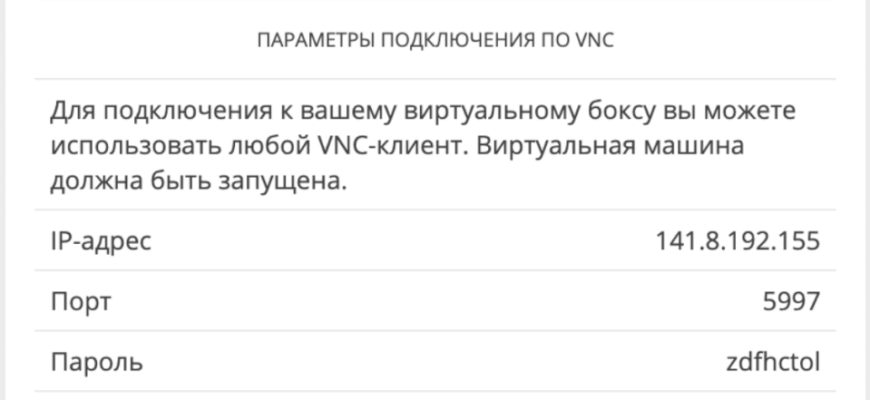
VNC (Virtual Network Computing) is a means of remote access to the console of your server. V NC will come in handy if for some reason you cannot connect to the server via SSH: for example, you blocked the SSH port with a firewall or we turned off the network for boxing.

The clipboard in VNC does not work, the password will need to be entered manually. Its characters will not be displayed on the screen (even encrypted) — this is normal.
If you see a black screen without text instead of the welcome window, press Enter.
You can connect via VNC directly from the Control Panel or use special programs:
Connection from Control Panel

Here the VNC connection parameters will not be useful: the Control Panel will transfer them to the web client itself.

If the console window doesn’t open, your browser probably doesn’t allow pop-up windows. Allow them to be shown in the settings.
Google Chrome and others:
Connecting to MacOS


The application will ask for a password:


Connection in Linux (Remmina)

Press Enter, the program will prompt you to enter a password:

Windows connection (UltraVNC)

Click «Connect», in the window that opens, enter the password:


Was this instruction helpful?
Free.sprinthost is a free hosting that gives the user the opportunity to host their website without paying. One of the main features of this hosting is the availability of SSH access, which greatly simplifies the process of developing and managing your project.
SSH (Secure Shell) is a network protocol that provides a secure remote connection to a server and allows you to perform various operations on a remote computer. It is the standard protocol for working with remote servers and is often used in web development.
Free.sprinthost provides the ability to connect to its servers via the SSH protocol. To do this, the user must generate a pair of keys: private and public. The private key remains with the user, while the public key must be uploaded to the server.
Connecting to the server using SSH is done using a special program called SSH client. The most popular SSH clients are PuTTY for Windows and OpenSSH for Linux and Mac.
After a successful connection, the SSH client command line will be the remote server’s command line interface. All commands that will be entered into the command line of the SSH client will be executed on the remote server.
The SSH protocol secures remote connections by encrypting the traffic between the client and the server. This means that data transmitted between users and the server cannot be intercepted or read by a third party.
In addition to connecting to a server, SSH also allows you to perform various operations on a remote server. For example, a user can upload and download files to the server, create and delete files and folders, manage access rights, install software, and more.
SSH access is a very valuable tool for developers as it allows them to perform many tasks on a remote server without having to physically be there. It simplifies the project management process and keeps data secure.
However, despite all the advantages of SSH access, its use requires certain knowledge and skills. Improper use of the SSH client can lead to server security vulnerabilities and account hacking. Therefore, it is recommended that you carefully study and follow all precautions when working with SSH.
In conclusion, free.sprinthost’s SSH access is a powerful tool for developers to provide a convenient and secure way to manage their projects. It provides a secure remote connection to a server and allows you to perform various operations on files and programs on a remote server. Using SSH access on free.sprinthost’s free hosting is expected to make developing and managing your projects more efficient and convenient.
SSH is a secure network protocol. It allows you to establish a connection over an encrypted tunnel and manage a remote server. For boxes with clean OS, this is the main way to interact with them.
To connect to VDS use:
Modern operating systems have built-in tools for connecting via SSH: in Linux and MacOS — the Terminal program, in Windows — PowerShell.
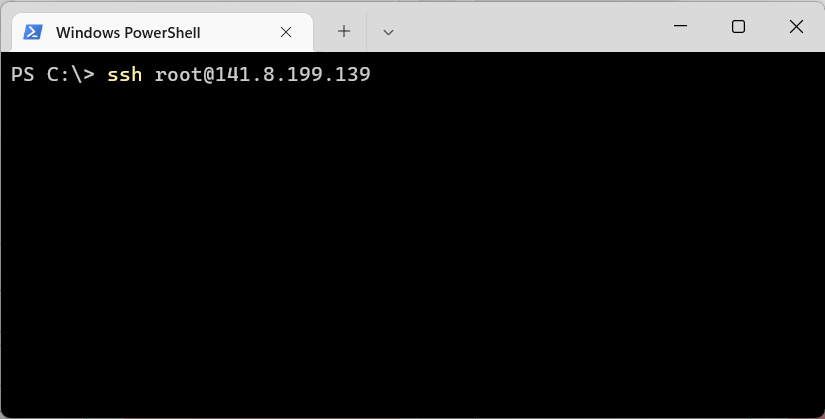
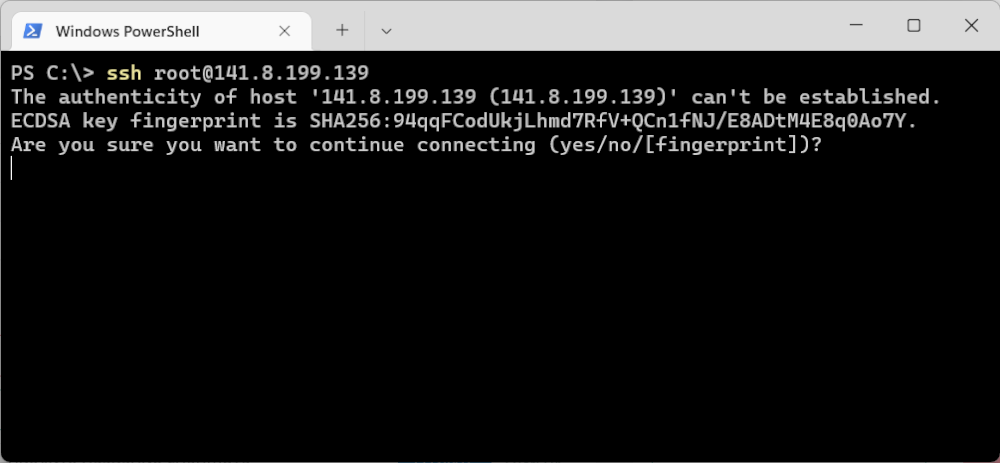
When you connect to the server for the first time, the program will warn you that it has not yet connected to this host and ask you to add it to the list of trusted hosts. Type yes and press Enter.
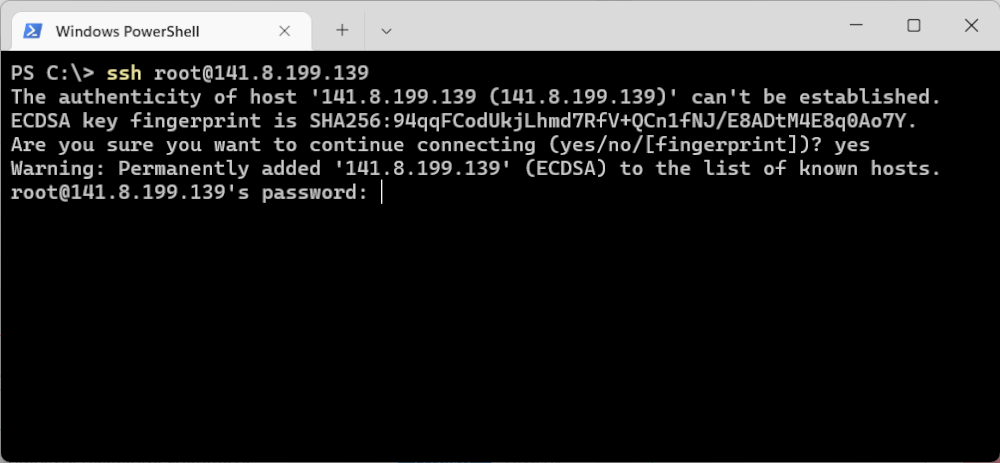
Next, the program will ask for a password — it is in the letter sent to you when creating the box. The password can be copied and pasted or entered manually — the characters will not be displayed, even masked, so systems ensure password security.
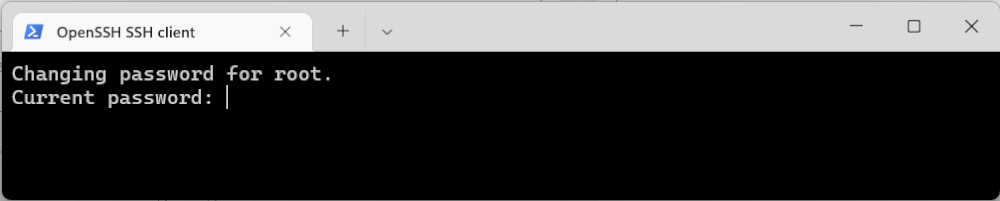
When connecting for the first time, the system will ask you to change the password. First, enter the current one — you can not manually, but paste it from the clipboard. Characters still won’t show up:
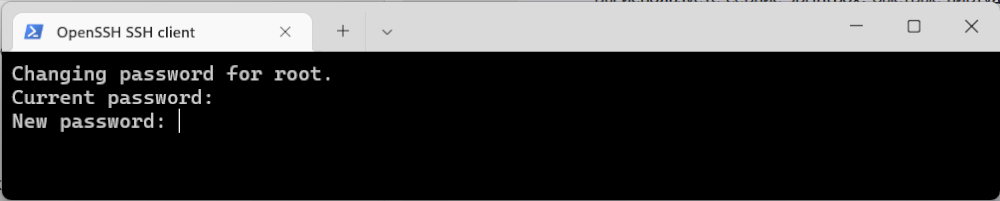
Next, the system will ask you to create a new password:
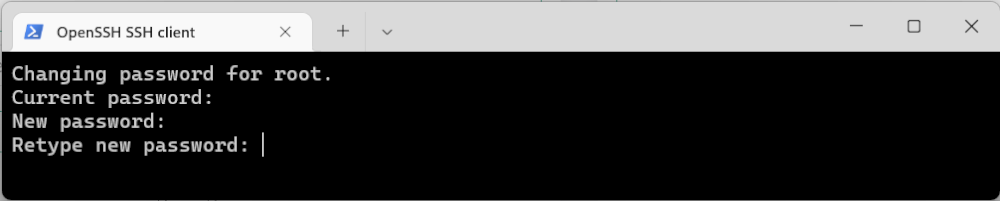
And repeat it:
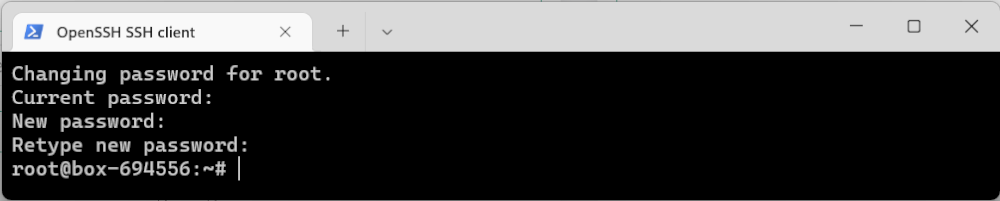
Done! Now you can work with boxing:
To be able to connect via SSH using keys, the public key must be stored on the box in the file ~/.ssh/authorized_keys .
Depending on the situation, this can be done in different ways.
If the box has not been created yet
In order to immediately configure it for authorization by key pair when creating a new box, you need to:
Note: in this case, the root password is not generated, respectively, it will be absent in the box creation email, and password access will be denied.
If the box has already been created and there is access with a root password
First, we generate a personal pair of keys — open (public) and closed (private). The private key remains on the local device, while the public key must be added as follows:
service sshd restart
If at the same time it is necessary to disable password authorization, add the rule to /etc/ssh/sshd_config:
Then restart sshd again.
If the box was created with authorization by another pair of keys
In this case, since we are unable to obtain the private key, we must first allow password authorization.
Since the root password is initially absent during this creation, but is required for connecting via VNC, the first step is to perform the “Reset root password” action. Next:
Next, connect to the server using the root password and make changes according to the algorithm from the previous paragraph.
