I’m talking about another wonderful Jetbrains product that I know personally — Teamcity. Like Youtrack, it has a free version with limitations that will allow a small team to fully enjoy the free version. The server part can be configured on your hardware.
Kubernetes Online Course — for developers, administrators, technical leaders who want to learn the modern Kubernetes microservices platform. The most complete Russian-language course on highly demanded and well-paid skills. The course is not for beginners — you need to pass an entrance test.
TeamCity is a direct analogue of Jenkins and Gitlab. I first met him many years ago, when I had neither skills nor theory on CI / CD. The familiar developers with whom I collaborated installed and asked them to help set up the deployment of some projects running in Docker.
Surprisingly, it was not difficult for me to figure it out and make a few simple pipelines within one day. Then they were finalized as the projects developed.
TeamCity is very user friendly. It has less functionality compared to Gitlab, but it is much easier to deal with it. Even if you now have some crutches configured on scripts, then first try to transfer them to TeamCity as is. There you can ssh to the servers right in the steps and do something. Then, already delving into the nuances and possibilities, you will slowly remake it into a normal version.
Fresh video in English on installing Teamcity, connecting to the repository, creating a build, connecting the agent and running the build:
https://youtube.com/watch?v=zqi4fDF-S60%3Ffeature%3Doembed
If you want to quickly get into the topic of CI / CD, then start on your own with Teamcity in a normal way. I later took training on Gitlab. Subjectively, I can say that it is more difficult to start with it. It is more confused, but, of course, it is also necessary to study it.
This article is primarily useful for those who use the same technology stack as our team, namely: ASP. NET, C#, NUnit, Selenium 2, git, MSBuild. Tasks such as git integration, building C# projects, NUnit tests (both unit and UI tests), and deployment to the server will be covered. However, there will certainly be something interesting for other users, except perhaps those who have eaten a dog on this issue. But again, they will be able to draw attention to errors in the article or advise something: for example, how to optimize the deployment phase.
What is «continuous integration» is excellently described here and here, it is hardly necessary to repeat this topic for the hundredth time.
Well, for starters, what can TeamCity (hereinafter referred to as simply TC) do? Or maybe it’s the following: when changes appear in the specified repository branch (or other event), execute a script that includes, for example, building an application, running tests, executing other scripts, uploading files to a remote server, etc.
The important point is that the “integration server” and “the machine on which this process will take place” are usually (not necessarily) different servers. Moreover, there can be several, even many, machines on which builds and tests are run, and all on different operating systems — in general, there is where to turn around.
To start the build process, an agent program is used that receives commands from the TC server, it can be run on any of the main OS (glory of Java multiplatform). You can install several agents on one computer and run them in parallel, but it is important to remember that one agent can only process one project at a time. When starting the task, TC selects the first suitable idle agent, and you can set «filters», for example, select an agent only with Windows OS or only with . NET version at least 4.0, etc.
Now you need to come up with a work scenario. We use the following branches in our work:
In general, almost standard git-flow, which you can read about in more detail, for example, here.
In this regard, our scenario will look like this:
For the release branch, we do the same, but while uploading new data, we suspend the server and show a stub.
And now go ahead — implement the scenario!
Get fresh changes from the repository
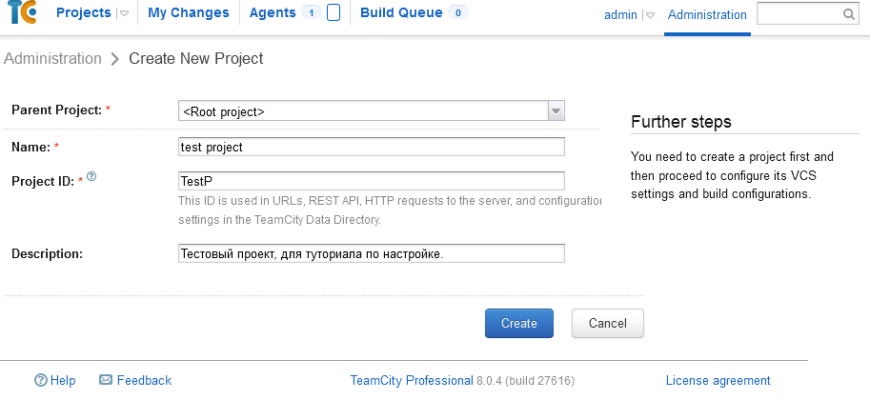
It all starts with the simple creation of a project.

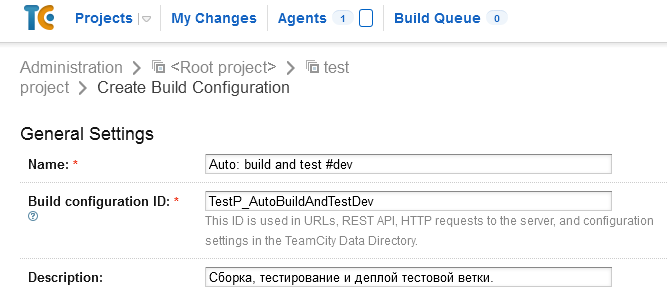
After — the creation of a «build configuration» (build configuration). The configuration defines the build script.
At the second step of creating the configuration, we will be asked about the VCS used, so we answer honestly that we have git here. You may have another VCS — don’t get lost. Adding a new repository is done with the Create and attach new VCS root button.
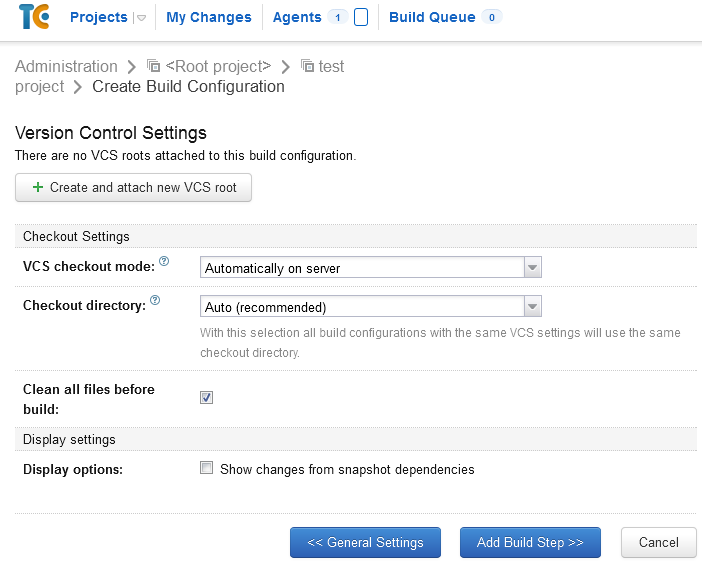
So, key settings:
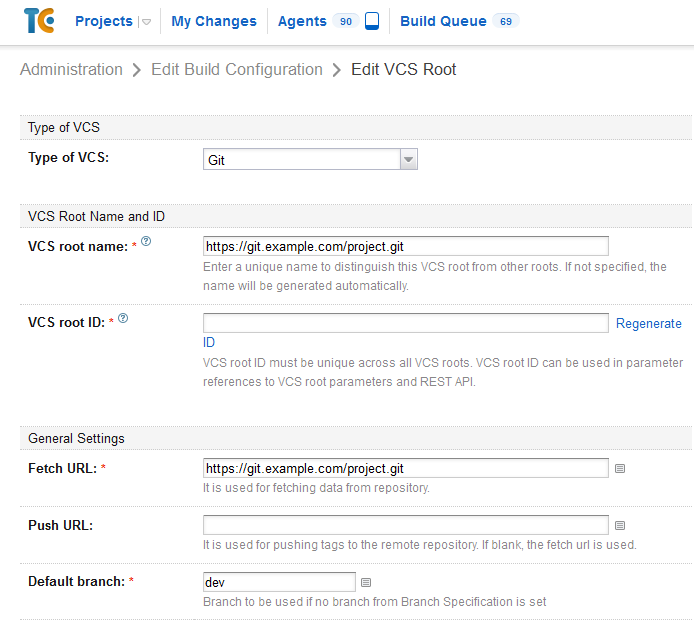
The rest of the variety of options is up to your taste and color.
Next, you need to configure the automatic start of the task. We go to “Build Triggers” (build conditions) and select the VCS Trigger condition — with default settings, it will check for new commits in the repository once a minute, and if there are any, it will start the task for execution.

Run interface tests (functional tests)
Everything is much more interesting here than with unit tests. Cap here suggests that in order to test the project in the browser, it, i.e. project to run. But here we cheated by starting the web server directly from the Selenium test code:
And the launch itself looks exactly the same as at the step with unit tests.

Stop and start the server for the release scenario
We solve it in a slightly wild but cute way. IIS has a feature: if you put a file with the name app_offline.html in the root of the site, then the site is cut off, when all files are accessed, the contents of this file will be displayed.
Minus — the appeal is exactly what TO ALL files, including static ones. So, if you want to make a stub with design, CSS and images, use inline styles and data: url, or, alternatively, put them on a separate server.
We enable/disable the server through the WinSCP script and the following files:
winscp.exe /console /script=server_off.txt
winscp.exe /console /script=server_on.txt
That is, initially the file is in the root and is called _app_offline.html. When we need to block access for the duration of an update, we rename it to app_offline.html. When uploading files, a new _app_offline.html file is uploaded, and after the end, the app_offline.html file is deleted. And we get exactly what was originally.
In the text of the stub page, I highly recommend using the refresh meta tag, which will periodically refresh the page. If by this time the update process has completed, the user will return back to the service, which will certainly be incredibly happy.
Calling the script for turning on the stub (the stub is turned off in the same way):
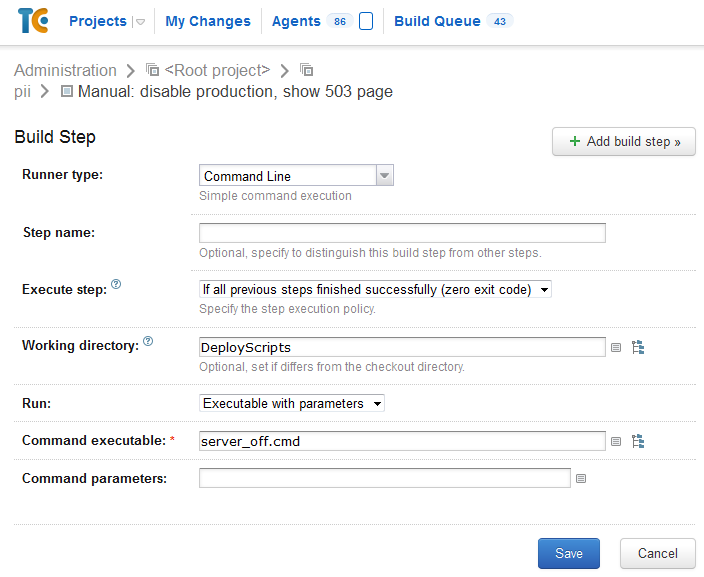
Yes, WinCSP lies as a result directly in the repository. Yes, the passwords are in the clear in the file. Yes, not the most elegant solution, but since only developers from our team have access to the repository and the virtual machine with the agent, why not? Yes, it would be possible to store a file with passwords, for example, directly on the agent, but in principle this would not increase security, but, for example, it would slow down the deployment of a new agent.
We have been using these settings for about half a year, and so far not a single problem has arisen — everything works like clockwork, which cannot but rejoice.
Update November 3, 2014.
By choosing Runner Type «Command line» you don’t need to escape spaces in any way — Team City will take care of it themselves.
Upload changes to test server
The server on which the TC agent is located and the server on which IIS is installed are different servers, moreover, they are located in different networks. Therefore, the files must somehow be delivered to the destination server. And here the solution is chosen, maybe not very elegant, but extremely simple. We use uploading via FTP, and MSBuild does this for us.
This is how this file (deploy.xml) will look like
And so — the task on his call:
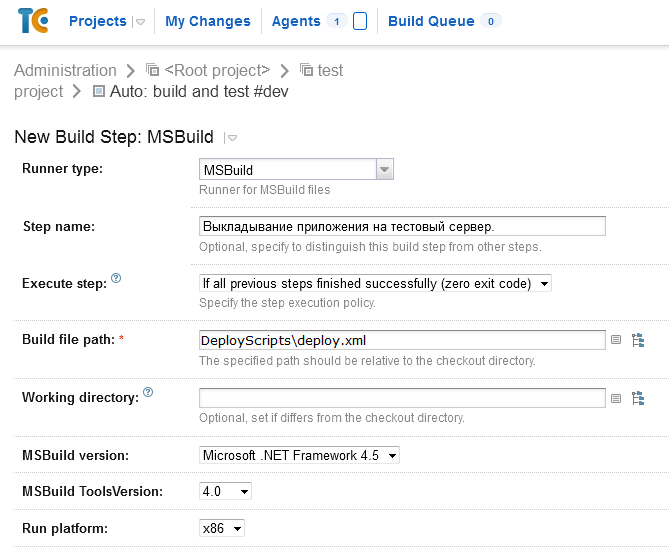
The disadvantage of the solution is that ALL files are uploaded, and not just new ones that have changed. On a project with a bunch of layout files or a lot of modules, this can become a problem due to the time spent on pouring.
Another noticed shortcoming is that when a file with a non-Latin character in the name is encountered, it crashes with an error. Latin and letters/numbers are processed normally. The legs of this problem seem to grow from the specifics of the FTP protocol: it is based on ASCII, but it does not describe exactly how to encode non-ASCII characters, suggesting «do it the way your server will understand it.» Accordingly, in order to cure the problem without changing the scheme, you need to patch MSBuild Community Tasks, fortunately, the sources are open. Well, or use an alternative way to upload files, for example, through WinSCP.
Run Unit Tests
With us, unit tests are a separate project within the solution. So in the previous step they are already compiled — it remains to run them.
Adding a new step, only now Runner is NUnit. Pay attention to the Execute step parameter: it indicates under what conditions the step should be executed, and has 4 values:
The most important thing here is to specify the correct path to the assembly with tests inside the project in the Run tests from column. Here, for example, it looks like this:
%teamcity.build.checkoutDir% is a variable pointing to the folder where the data from the repository is downloaded. In principle, it is not required to be specified, because by default, the path is relative to this directory, so the path could be shortened to:
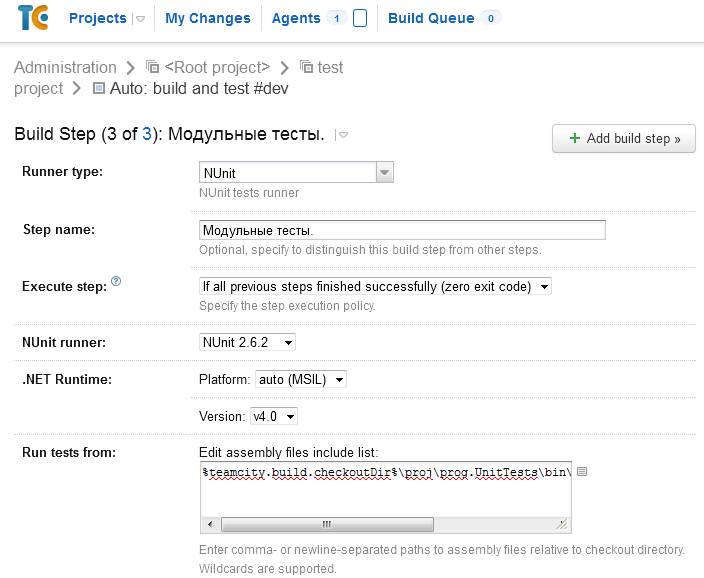
Separately, I will note the Run recently failed test first option — if some tests failed in the previous run, then they will be the first to run on the next run, and you will quickly learn about the success of the latest changes.

Compile project
Since we have a project in ASP. NET as a Solution from Visual Studio — everything was simple here too.
Go to the «Build Steps» menu, select the runner type (and there are really a lot of them) and stop at MSBuild. Why exactly on it? It provides a fairly simple way to describe the build process, even a fairly complex one, by adding or removing various steps in a simple XML file.
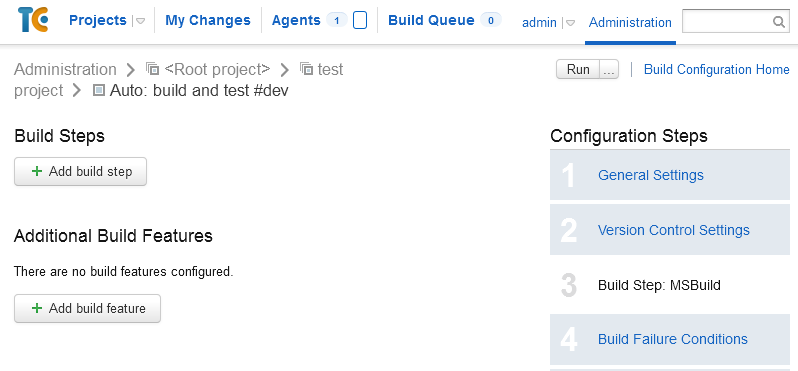
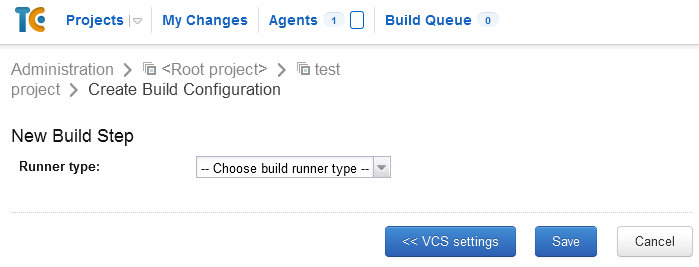
Further, everything is elementary.

Build file path – path to the sln file.
MSBuild version, MSBuild ToolsVersion and Run platform are selected according to the requirements of your project.
If there are several configurations in the project, then you can use the Command line parameters option to enter something like this key:
where Production is replaced by the desired config.
Enable downloading NuGet packages
An important point if you are using NuGet packages; if not, you can go directly to the next item.
Since NuGet packages weigh a lot, and you don’t want to store library binaries in the repository without special need, you can use the wonderful NuGet Package Restore option:
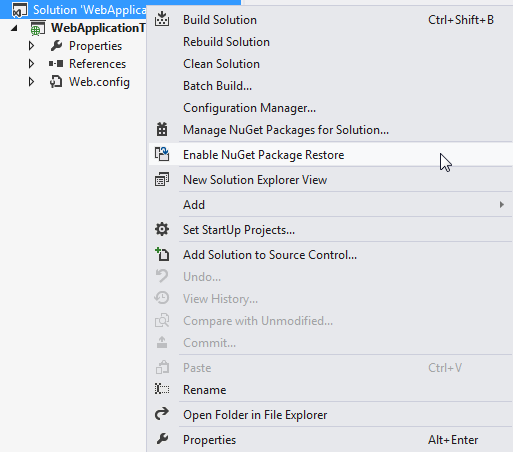
In this situation, library binaries are not included in the repository, but are downloaded as necessary during the build process.
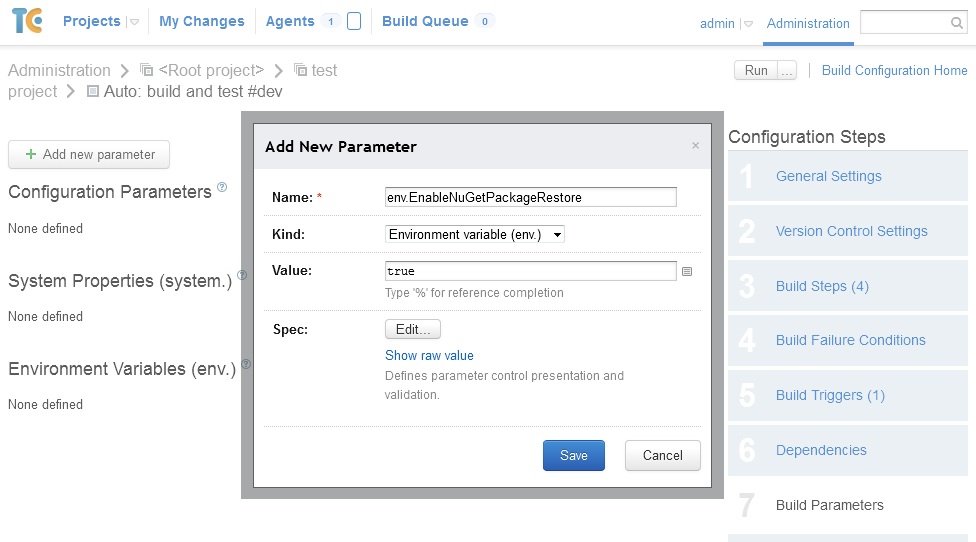
But MSBuild is a real gentleman and will not make unnecessary gestures without permission, therefore, it will not just download packages just like that — it needs to be allowed to do this process. To do this, you will either have to set the Enable NuGet Package Restore environment variable to true on the client, or go to the Build Parameters menu and set it there.