

- Error 502 when opening the site
- General characteristics of the 502 Bad Gateway error
- SSL/TLS negotiation failure between CloudFront and a custom origin server
- Online SSL checker
- OpenSSL
- Tips for users
- How to clear DNS cache
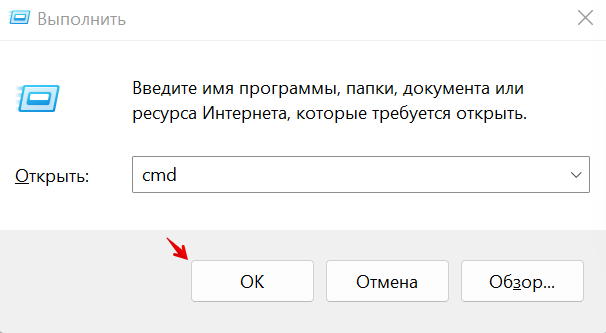
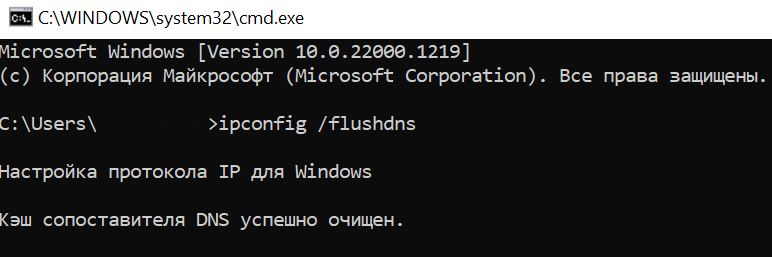
- Windows
- Linux
- MacOS
- How to fix error 502 as a site owner
- Error 502 Bad Gateway
- Tips for the user to fix error 502
- SSL/TLS certificate on the origin is expired, invalid, self-signed, or the certificate chain is in the wrong order
- Using the top command
- Check WordPress plugins
- Check how auxiliary services work, such as MySQL and Memcached
- Try disabling anti-DDoS
- Increase the amount of resources
- Ask colleagues for help
- If this did not help, you should seek the advice of a specialist
Topics
Error 502 — what does it mean and how to fix it? We will talk about this in the article.
What are we talking about? If the server that your device is communicating with receives an incorrect response from a higher level server, a 502 Bad Gateway error will be displayed on the computer or smartphone screen, making it impossible to work.
What to pay attention to? The problem most often occurs due to failures in the DNS, proxy or hosting functions. But the situation is fixable, and not only the resource administrator can do this. Often enough and competent actions of an ordinary user.
The article says:
- Causes of error 502
- Tips for the user to fix error 502
- Recommendations for the administrator to fix error 502
Error 502 when opening the site
Most often, the 502 error occurs due to server overload. The reasons for overload may be as follows:
PHP errors can also cause 502 Gateway Error. Problems in work can be caused by incorrectly configured plugins and errors in the site code.
The problem may also arise on the user’s side. Extensions installed in the browser may disrupt the connection to the site server.
General characteristics of the 502 Bad Gateway error
Any site consists of a large number of files: CSS styles, codes, media content, HTML documents, etc. All this data is stored on a web server. To open the page and access the content, the browser sends a request to the server. If the answer is not received for some reason, a server error 502 appears.
In translation, error 502 Bad Gateway means “bad gateway”, respectively, the problem is on the gateway, which is the proxy server. That is, a bug occurs if the proxy cannot receive data from the source. The HTTP status code 502 is used by the web server to describe the error.

General characteristics of the 502 Bad Gateway error
The problem can spread both to the entire site, and to its individual pages. Depending on the program that was used to create the web server, there are two main varieties of the 502 error — Bad Gateway Nginx or Bad Gateway Apache. The causes of the problem are the same.
Also, this error can have other formulations:
- Error 502.
- HTTP 502.
There can be a web server between the server and the browser, which stores the website files and is used to reduce the load. It finds the required page in the catalog and submits it in response to the user’s request. The browser processes the received file and displays it on the screen. Since the web server acts as an intermediary between the browser and the server, it is he who notifies the user about the problem.
The most common cause of error 502 when opening a site is server overload, which can occur for a number of reasons:

Causes of error 502
Another reason for such a bug may be incorrect operation of the PHP script. Incorrectly configured plugins can generate a 502 site error.
A browser bug may also be the reason. The problem may be on the user’s side if he has extensions installed that break the connection to the site server.
SSL/TLS negotiation failure between CloudFront and a custom
origin server
To determine whether domain names in the certificate match the Origin Domain Name in the distribution or the
Host header, you can use an online SSL checker or OpenSSL. If the domain names don’t match, you have two options:
Online SSL
checker
To find an SSL test tool, search the internet for «online ssl checker.» Typically, you
specify the name of your domain, and the tool returns a variety of
information about your SSL/TLS certificate. Confirm that the certificate
contains your domain name in the Common Name or
Subject Alternative Names fields.
OpenSSL
openssl s_client -connect origin domain
name:443
openssl s_client -connect origin domain
name:443 -servername
CNAME
Tips for users
If you are a user and see a 502 error on the site, do the following:
How to clear DNS cache
How to clear the DNS cache depends on your operating system. Below we have described how to clear the DNS cache on Windows, Linux and MacOS.
Windows
Linux
sudo service network-manager restart
sudo /etc/init.d/nscd restart
MacOS
sudo killall -HUP mDNSResponder
How to fix error 502 as a site owner
Above, we told you what error 502 means. Now let’s figure out how to fix the error if you are the owner of the site.
First of all, check the amount of free RAM. This can be done in two ways.
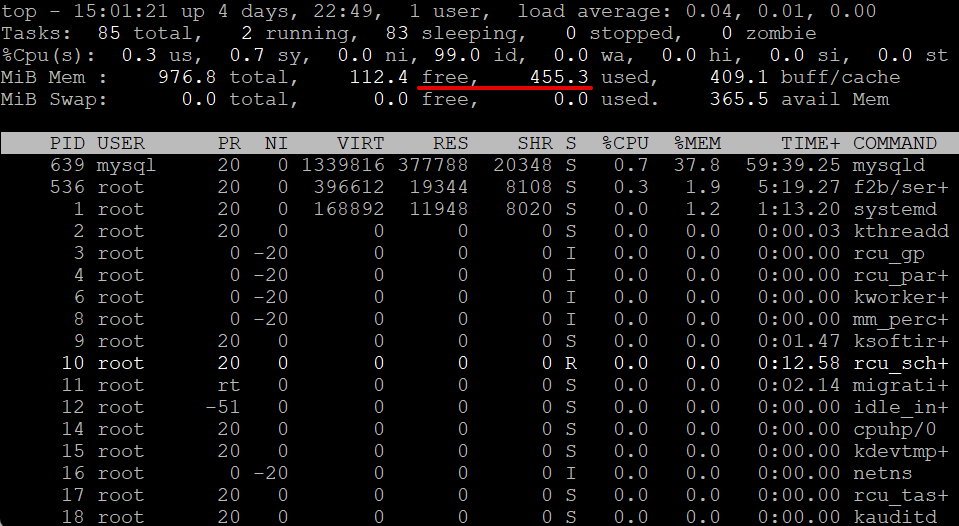
MiB Mem is all RAM.
MiB Swap — swap partition.
Find the line MiB Mem — free. This is the amount of free RAM on the server. If it is not enough, the error occurs due to lack of memory. To solve the problem, increase the amount of RAM.

Mem is all random access memory.
Swap is a swap partition.
Find the string Mem — free. It indicates the amount of free RAM on the server. If it is not enough, the error occurs due to lack of memory. To solve the problem, increase the amount of RAM.
If there is enough RAM, go to the next step.
Check server logs. If the problem occurred after updates to the site, check the changelog and undo the changes that caused the server to crash. In addition, you can see a DDoS attack in the logs. If you see the error «OOM (out of memory)», then the reason is the lack of memory.
Check the correct operation of auxiliary services such as MySQL and Memcached. Their incorrect operation can cause 502 errors.
If your site is made on WordPress, try disabling plugins. They can affect server performance. To disable the plugin:
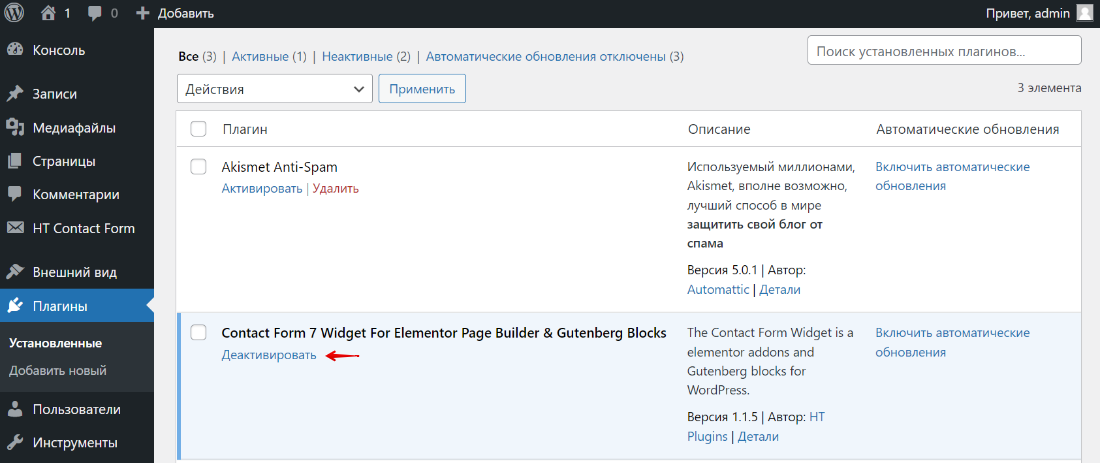
If you know which plugin affected the work, disable only it. If not, disable all plugins and enable them one by one until you find the one that caused the error on the site.
On VPS and dedicated servers, the problem may occur due to incorrect operation of the backend server (for example, Apache). If Nginx cannot receive a response from this service, a 502 error will be raised. Site owners encounter an error when:
If you are unable to fix error 502 yourself, please contact technical support. Describe in detail the problem you encountered and the steps you took to resolve it. Specify the time at which the error was observed, and the name of the site. If the error occurs after doing something (submitting a form, adding files), please describe the steps to reproduce the problem.
Error 502 Bad Gateway
The files of each site are located on the server. To get these files and open the site, the browser sends a request to the server. If for some reason the request is not answered, an error with code 5** occurs.
Gateway error 502 may occur when not working correctly:
The problem can be observed both on the entire site and on individual pages. It depends on the cause of the error. Error 502 has varieties: Bad Gateway Nginx and Bad Gateway Apache. This error can also be called:
- Error 502,
- HTTP 502,
Tips for the user to fix error 502
Error 502: what to do?
Top 30 most demanded and highly paid professions in 2023
Will help to understand the current situation in the labor market
A selection of 50+ IT resources
Only the best telegram channels, Youtube channels, podcasts, forums and much more to learn new things about IT
TOP 100 job search sites from GeekBrains
List of verified resources of real vacancies with an income of 150,000 ₽
Already downloaded 22003

Tips for the user to fix error 502
Below are instructions for different operating systems:
Some distributions may require you to run other commands.
SSL/TLS certificate on the origin is expired, invalid,
self-signed, or the certificate chain is in the wrong order
In WordPress, it is located in the wp-content folder, the file name is debug.log. If there is no such file or it is empty, then you need to enable logging in the wp-config.php configuration file.
If you have a VPS/VDS or a dedicated server, you need to additionally look at the server logs. This will help determine:
Based on the results of the check, actions can be taken to solve the problem.
Using the top command
Fixing error 502 on a virtual server can be started by checking with the top command (this option is most often not available on shared hosting).

Recommendations for the administrator to fix error 502
Checking can reveal the following causes of the problem:
Check WordPress plugins
If your site is built on WordPress, some plugins and themes may affect server performance. Sign in to the control panel. If you use the REG. Site, you can do this from your personal account. Go to the «Plugins» — «Installed» tab. Click «Deactivate» for the one you think affected the site.

You can disable all plugins at once to make sure that one of them is really interfering. And then turn on one by one until you find the one that causes the error.
Check how auxiliary services work, such as MySQL and Memcached
Sometimes they can cause a 502 error.
Try disabling anti-DDoS
Often, hosting companies offer ready-made tools that prevent DDoS attacks by redirecting visitor traffic to special servers. There, DDoS requests are separated from real ones, and already cleared ones are transferred to your resource. If any failure occurs in this sequence of processes, then a 502 error occurs. To fix the problem, try temporarily disabling anti-DDoS.
Increase the amount of resources
Lack of hosting capacity on which the site is hosted can be the cause of the 502 error. This occurs especially often when using virtual servers. If during the operation of the site you exceed the limits of the tariff plan, the hosting terminates the connection. Usually information about this can be found in the logs. In this case, you need to rent a server with a large number of processors and RAM.
Ask colleagues for help
Check your ISP’s FAQ or Stack Overflow for a solution. Most likely, you are not the first one who encountered a similar situation, and a working version of fixing the bug has already been described. If the advice found on the Internet does not turn out to be useful, you can create your own topic on the forum or ask for help from more experienced colleagues.
Contact your hosting provider’s support team and describe in detail the problem and any actions that have been taken.
If this did not help, you should seek the advice of a specialist
He will analyze the problem, find out the cause of the error and eliminate it.
Error 502 Bad Gateway is not uncommon. Both specialists and users of the site can cope with it. Regular optimization of web resources will have a positive impact on their performance and accessibility.
