
- Fault tolerance
- Software selection
- Configuration examples
- On network equipment
- Choosing Syslog server software
- Задача
- В веб-интерфейсе Заббикса
- Формат сообщений и legacy
- Alternative to syslog protocol: RELP
- How do I access my Syslog server?
- Server
- Interaction with logrotate
- Logs written by rsyslog itself
- Logs written by the application and read by rsyslog
- Automatic card attachment
- How do I create a Syslog server?
- rsyslog configuration
Fault tolerance
You can set an Action to execute only if the previous Action was paused: Description
. This allows you to customize the failover configuration. Some Actions use transactions to improve performance. In such a case, success or failure will only be known after the transaction is completed, when the messages have already been processed. This may cause some messages to be lost without calling the failover Action. To prevent this from happening, you need to set the parameter queue.dequeuebatchsize="1"
(default is 16), which can reduce performance.
 ruleset(name="sendToLogserver") { action(type="omrelp" Target="syslog1.example.net" Port="20514" Template="LongTagForwardFormat") action(type="omrelp" Target="syslog2.example.net" Port="20514" Template="LongTagForwardFormat" action.execOnlyWhenPreviousIsSuspended="on" queue.dequeuebatchsize="1")
}
I haven’t tried this feature in production yet.
Software selection
Why do you even need a syslog server when there are elastic beats, logstash, systemd-journal-remote and many other brilliant new technologies?
- This is the standard for logging on POSIX-compliant systems.
Some software, such as haproxy, uses only it. That is, you still won’t be able to get rid of syslog completely
- It is used by network hardware
- More difficult to set up, but richer in features than alternative solutions.
For example, Elastic Filebeat still doesn’t know how to inotify.
- Undemanding to memory. Possible use on embedded systems after slight tuning
. - Allows you to modify the message before saving/forwarding.
A strange task, but sometimes required. For example, PCI DSS
section 3.4 requires card numbers to be masked or encrypted if they are saved to disk. The subtlety is that if someone entered the card number in the search bar or in the feedback form, then as soon as you saved the request to the log, you are violating the standard.
Observation
: users try to enter the card number in any input field on the page, and strive to report it to the support along with the CVV.
Configuration examples
Write all messages of categories auth and authpriv to a file /var/log/auth.log
, and continue processing them:
 # legacy
auth,authpriv.* /var/log/auth.log
# новый формат
if ( $syslogfacility-text == "auth" or $syslogfacility-text == "authpriv" ) then { action(type="omfile" file="/var/log/auth.log")
}
All messages with the program name beginning with «haproxy» are written to a file /var/log/haproxy.log
, without flushing the buffer to disk after each message is written, and stop further processing:
 # legacy (обратите внимание на минус перед именем файла, отключающий сброс буфера)
:programname, startswith, "haproxy", -/var/log/haproxy.log
& ~
# новый формат
if ( $programname startswith "haproxy" ) then { action(type="omfile" file="/var/log/haproxy.log" flushOnTXEnd="off") stop
}
# можно совмещать
if $programname startswith "haproxy" then -/var/log/haproxy.log
&~
Check config: rsyslogd -N 1
. More configuration examples: examples
.
On network equipment
Everything is simple here. Specify the machine with the Zabbix server or Zabbix proxy as the destination for syslog messages. Configure the equipment to send messages of any severity and facility.
On some D-Link it might look something like this:
 enable syslog
create syslog host 1 ipaddress 10.2.0.21 severity debug state enable
And let’s say on a Cisco router like this:
 cisco1#
cisco1#config terminal
Enter configuration commands, one per line. End with CNTL/Z.
cisco1(config)#logging 10.2.0.21
cisco1(config)#service timestamps debug datetime localtime show-timezone msec
cisco1(config)#service timestamps log datetime localtime show-timezone msec
cisco1(config)#logging facility local3
cisco1(config)#logging trap informational
cisco1(config)#end
Set up? Go ahead.
Choosing Syslog server software
As you can see from the description of the tools in our list, you can choose a straightforward Syslog server, or opt for an analytical tool or a network monitoring system that incorporates Syslog server functions.
Beyond the basic functions of transferring Syslog messages to files, you can look for the capabilities to sort and filter messages
. The ability to vary processing according to message types and drop debug messages and information notifications is useful. A programmer might need to see those debug messages, and so the ability to selectively direct message types to a viewer
, a log file
, or to a database
can be very useful.
The evolution of Syslog processing to store records in a database rather than a file offers you great power. It is far easier to index, sort, search, and filter records
in a database than it is to manipulate file records. This is because databases include a structured query language that enables you to isolate fields in records and perform selection, grouping, and exclusion functions on data without altering the original stored records.
Another useful advancement in the Syslog servers available today is a system that can collect messages generated by other platforms and protocols
, such as the Windows event logger. If your Syslog server can create standardized record formats
, that takes you another step further along the route to collect important information about your system.
Getting alerts created for the conditions reported by Syslog will also give you extra power to focus your energy on essential tasks. The ability to create your own alert conditions represents an advancement in Syslog processing
. Sometimes, the contents of a message might not create concern. However, a sudden surge in the frequency of such messages should become an alert and you can specify such conditions in many of the Syslog servers listed in this full review. The ability to combine a count of message types or error conditions is another useful feature
that many modern Syslog servers include.
A Syslog server embedded in a network centralized management tool can provide excellent analysis capabilities. If you already have all the analytical tools you need, then you would be better off focusing on the vanilla Syslog server tools in this review. However, if you have very little budget for system management software and you don’t currently have any analytical tools
, then go for a free system management utility that includes a Syslog server to keep control of your IT infrastructure.
Managing IT services requires proper tools. Take a look at the free software
recommended in this full review that fits your operating system. Our Editor’s choice is an excellent place to start and the SolarWinds Kiwi Syslog Server
is a comprehensive logging tool. Take a little time to play around with each tool so you can discover their features for yourself. Given that all of these tools are free, you have nothing to lose but the time it takes to learn them.
Задача
Передавать лог-файлы на центральный сервер:
- При недоступности сервера не терять сообщения, а накапливать и передавать при его появлении в сети.
- Корректно передавать многострочные сообщения.
- При появлении новых лог-файлов, достаточно перенастройки клиента, не требуется изменение конфигурации сервера
- Можно передавать содержимое всех лог-файлов с соответствующим шаблону именем, причём на сервере их содержимое будет сохраняться раздельно в файлы с таким же именем.
Условия: в инфраструктуре используются только Linux-сервера.
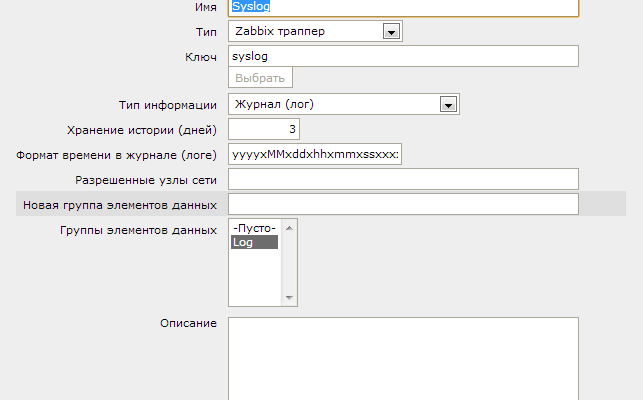
В веб-интерфейсе Заббикса
Начнем с самого простого и понятного. В Zabbix’e создадим шаблон Template_Syslog и добавим в нем один единственный элемент данных:

Заполним поля следующим образом:
Формат сообщений и legacy
TLDR: всё плохо
Syslog появился в 80-х, и быстро стал стандартом логирования для Unix-like систем и сетевого оборудования. Стандарта не было, все писали по принципу совместимости с существующим софтом. В 2001 IETF описал текущее положение вещей в RFC 3164 (статус «informational»). Т. к. реализации очень отличаются, то в частности в этом документе сказано «содержание любого IP пакета отправленного на UDP порт 514 должно рассматриваться как сообщение syslog». Потом попробовали стандартизировать формат в RFC 3195, но документ получился неудачным, для него в данный момент нету ни одной живой реализации. В 2009 приняли RFC 5424, определяющий структурированные сообщения, но этим редко кто пользуется.
Вот тут
можно прочитать, что обо всём этом думает автор rsyslog Рейнер Герхард (Rainer Gerhards). Фактически, по-прежнему все реализуют syslog как попало, и задача интерпретировать всё это разнообразие ложиться на syslog-сервер. Например, в rsyslog включен специальный модуль
для разбора формата, используемого CISCO IOS, ну и для самых плохих случаев начиная с пятой версии можно определять собственные парсеры.
Сообщения syslog при передаче по сети выглядят примерно так:
<PRI> TIMESTAMP HOST TAG MSG -
PRI
— Priority. Вычисляется какfacility * 8 + severity
. -
TIMESTAMP
— время, обычно в формате «Feb 6 18:45:01». Согласно RFC 3164, может записываться в формате времени ISO 8601: «2017-02-06T18:45:01.519832+03:00» с большей точностью и с учётом используемой временной зоны. -
HOST
— имя хоста, сгенерировавшего сообщение -
TAG
— содержит имя программы, сгенерировавшей сообщение. Не более 32 алфавитно-цифровых символов, хотя по факту многие реализации позволяют больше. Любой не-алфавитноцифровой символ заканчивает TAG и начинает MSG, обычно используется двоеточие. Иногда в квадратных скобках содержит номер сгенерировавшего сообщение процесса. Т. к.[ ]
— не алфавитно-цифровые символы, то номер процесса вместе с ними должен считаться частью сообщения. Но обычно все реализации считают это частью тега, считая сообщением всё после символов «: » -
MSG
— сообщение. Due to the uncertainty about where the tag ends and the message begins, a space may be added to the beginning. Cannot contain newline characters: they are frame separators and will start a new message. Ways to still forward a multiline message:- shielding. Receive text on the receiver side with
#012
instead of newlines - use octet-counted TCP Framing as defined in RFC 5425 for TLS-enabled syslog. Non-standard, only some implementations.
- shielding. Receive text on the receiver side with
Alternative to syslog protocol: RELP
If messages are sent between hosts using rsyslog, you can use instead of plain TCP sysog RELP
— Reliable Event Logging Protocol. It was created for rsyslog, and is now supported by some other systems. In particular, it is understood by Logstash and Graylog. It uses TCP for transport. Can optionally encrypt messages using TLS. More reliable than plain TCP syslog, does not lose messages when the connection is broken. Resolves an issue with multiline messages.
How do I access my Syslog server?
The access method for a Syslog server depends on your operating system and the specific Syslog server that you chose to install. On Linux, the Syslog server is more likely to be a command line utility. If you have a Linux flavor with a graphical interface, such as Ubuntu, you might be able to have a GUI Syslog server package.
GUI interfaces are very common for Windows-based Syslog servers. In these cases, the installer may well have created a shortcut icon on your Desktop. If you don’t see it there, click on the Start menu button and search through that list of available programs.
Server
On the server, it is necessary to accept the transferred logs and decompose them into directories, in accordance with the IP of the transmitting host and the time of receipt: /srv/log/192.168.0.1/2017-02-06/myapp/my.log
. In order to set the name of the log file depending on the content of the message, we can also use wildcards. Variable $.logpath
will need to be set inside the RuleSet before using the template.
 template(name="RemoteLogSavePath" type="list") { constant(value="/srv/log/") property(name="fromhost-ip") constant(value="/") property(name="timegenerated" dateFormat="year") constant(value="-") property(name="timegenerated" dateFormat="month") constant(value="-") property(name="timegenerated" dateFormat="day") constant(value="/") property(name="$.logpath" )
}
Load the necessary modules and turn off $EscapeControlCharactersOnReceive
, otherwise all newlines in the received logs will be replaced by \n
 # Accept RELP messages from network
module(load="imrelp")
input(type="imrelp" port="20514" ruleset="RemoteLogProcess")
# Default parameters for file output. Old-style global settings are not working with new-style actions
module(load="builtin:omfile" FileOwner="syslog" FileGroup="adm" dirOwner="syslog" dirGroup="adm" FileCreateMode="0640" DirCreateMode="0755")
# Module to remove 1st space from message
module(load="mmrm1stspace")
# http://www.rsyslog.com/doc/v8-stable/configuration/input_directives/rsconf1_escapecontrolcharactersonreceive.html
# Print recieved LF as-it-is, not like '\n'. For multi-line messages
# Default: on
$EscapeControlCharactersOnReceive off
Now let’s create a RuleSet that parses the arrived logs and sorts them into folders. Services that rely solely on syslog for logging expect it to save message time. Therefore, we will save the logs that arrived from the standard facility in the syslog format, and for those that arrived from the local0-local7 facility, we will remove the log name from the field TAG
, and log only the message itself without the rest of the syslog fields. The problem with the space glued to the message remains for RELP, because it arises at the stage of parsing messages, we will cut off this space.
To increase performance, we will write asynchronously: asyncWriting="on"
and with a large buffer ioBufferSize=64k
. We will not flush the buffer after each received message flushOnTXEnd="off"
, but we will do it every second so that the logs appear on the log server quickly enough: flushInterval="1"
.
 ruleset(name="RemoteLogProcess") { # For facilities local0-7 set log filename from $programname field: replace __ with / # Message has arbitary format, syslog fields are not used if ( $syslogfacility >= 16 ) then { # Remove 1st space from message. Syslog protocol legacy action(type="mmrm1stspace") set $.logpath = replace($programname, "__", "/"); action(type="omfile" dynaFileCacheSize="1024" dynaFile="RemoteLogSavePath" template="OnlyMsg" flushOnTXEnd="off" asyncWriting="on" flushInterval="1" ioBufferSize="64k") # Logs with filename defined from facility # Message has syslog format, syslog fields are used } else { if (($syslogfacility == 0)) then { set $.logpath = "kern"; } else if (($syslogfacility == 4) or ($syslogfacility == 10)) then { set $.logpath = "auth"; } else if (($syslogfacility == 9) or ($syslogfacility == 15)) then { set $.logpath = "cron"; } else { set $.logpath ="syslog"; } # Built-in template RSYSLOG_FileFormat: High-precision timestamps and timezone information action(type="omfile" dynaFileCacheSize="1024" dynaFile="RemoteLogSavePath" template="RSYSLOG_FileFormat" flushOnTXEnd="off" asyncWriting="on" flushInterval="1" ioBufferSize="64k") }
} # ruleset
Interaction with logrotate
Logs written by rsyslog itself
Normally rotated using the default scheme: smth.log
renamed to smth.log.1
, a new one is created smth.log
. The post-rotate action is to send SIGHUP to the rsyslogd process. Remark
: rsyslog does not reload configuration on SIGHUP, only reopens all log files.
 /var/log/someapp/*.log{ weekly missingok rotate 5 create 0644 syslog adm sharedscripts postrotate test -s /run/rsyslogd.pid && kill -HUP $(cat /run/rsyslogd.pid) # postrotate script should always return 0 true endscript
}
Logs written by the application and read by rsyslog
For applications that can reopen files on demand (SIGHUP or something else), no additional configuration is required. rsyslog will notice the inode changes of the file and reopen it.
Problems appear with logrotate option copytruncate
, which is for smth.log
creates a copy of it smth.log.1
and crops it to zero size. rsyslog simply stops reading newlines from such a file (at least until it exceeds the size before rotation). Since version 8.16.0, module imfile
has option reopenOnTruncate
(default "off"
, turn on "on"
). This option causes rsyslog to reopen the file when trimmed (the inode has not changed, but the size has decreased). The option is marked as «experimental», but it works fine in my production. For versions older than 8.16.0, you can fix rotation from copytruncate
by sending a SIGHUP signal to the rsyslogd process in a post-rotate action.
Remark
: on Debian/Ubuntu by default the output and result of logrotate is not saved anywhere, if it breaks you won’t know. I advise you to fix it in /etc/cron.daily/logrotate
.
Automatic card attachment
Let’s touch on another important point that simplifies working with syslog messages — context transition from the network map.
One could spend a day or two and suffer adding URL links for each host to its syslog item by hand:

But rather, the hands will dry up to click on the mouse, or you will be touched by the mind. Let’s turn to Zabbix API again for help in automating this routine:
To do this, we throw in a script that will
1) Take all the elements of the network map
2) For all elements of type host, check if it has a data element with key=syslog
3) If there is, add to the list of existing URLs a link to view this item (if the URL to Syslog already exists, then do nothing)
When the script is ready, we will deploy it only on Zabbix-server:
 #!/usr/bin/perl
#fixed URL for ZBX 2.4
use 5.010;
use strict;
use warnings;
use JSON::RPC::Legacy::Client;
use Data::Dumper;
use Config::General;
our $VERSION = 1.1;
my $conf = Config::General->new('/usr/local/etc/zabbix_syslog.cfg');
my %Config = $conf->getall;
#Authenticate yourself
my $client = JSON::RPC::Legacy::Client->new();
my $url = $Config{'url'} || die "URL is missing in zabbix_syslog.cfg\n";
my $user = $Config{'user'} || die "API user is missing in zabbix_syslog.cfg\n";
my $password = $Config{'password'} || die "API user password is missing in zabbix_syslog.cfg\n";
my $server = $Config{'server'} || die "server hostname is missing in zabbix_syslog.cfg\n";
my $debug = $Config{'debug'};
my ( $authID, $response, $json );
my $id = 0;
$authID = login();
my $syslog_url_base = 'history.php?action=showvalues'; my @selements; foreach my $map ( @{ map_get_extended() } ) { my $mapid=$map->{sysmapid}; #next unless ($mapid == 120 or $mapid == 116); #debug #put all mapelements into array @selements (so you can update map later!) @selements = @{ $map->{selements} }; foreach my $selement (@selements) { my $syslog_button_exists = 0; if ( $debug > 0 ) { print 'Object ID: ' . $selement->{selementid} . ' Type: ' . $selement->{elementtype} . ' Elementid ' . $selement->{elementid} . " \n"; } # elementtype=0 hosts if ( $selement->{elementtype} == 0 ) { my $hostid = $selement->{elementid}; my $itemid = get_syslogid_by_hostid($hostid); if ($itemid) { #and add urls: my $syslog_exists = 0; foreach my $syslog_url ( @{ $selement->{urls} } ) { $syslog_exists = 0; if ( $syslog_url->{name} =~ 'Syslog' ) { $syslog_exists = 1; $syslog_url->{'name'} = 'Syslog'; $syslog_url->{'url'} = $syslog_url_base . '&itemids[' . $itemid . ']=' . $itemid; } } if ( $syslog_exists == 0 ) { #syslog item doesn't exist... add it push @{ $selement->{urls} }, { 'name' => 'Syslog', 'url' => $syslog_url_base . '&itemids[' . $itemid . ']=' . $itemid }; } } } } map_update($mapid,\@selements); }
logout();
#______SUBS
sub get_syslogid_by_hostid { my $hostids = shift; $json = { jsonrpc => '2.0', method => 'item.get', params => { output => ['itemid'], hostids => $hostids, search => { 'key_' => 'syslog' }, limit => 1, }, id => $id++, auth => $authID, }; $response = $client->call( $url, $json ); # Check if response was successful if ( !$response->content->{'result'} ) { logout(); die "item.get failed\n"; } #return itemid of syslog key (trapper type) return ${ $response->content->{'result'} }[0]->{itemid};
}
sub login { $json = { jsonrpc => '2.0', method => 'user.login', params => { user => $user, password => $password }, id => $id++, }; $response = $client->call( $url, $json ); # Check if response was successful die "Authentication failed\n" unless $response->content->{'result'}; if ( $debug > 0 ) { print Dumper $response->content->{'result'}; } return $response->content->{'result'};
}
sub map_get { #retrieve all maps $json = { jsonrpc => '2.0', method => 'map.get', params => { output => ['sysmapid'] }, id => $id++, auth => "$authID", }; $response = $client->call( $url, $json ); # Check if response was successful if ( !$response->content->{'result'} ) { logout(); die "map.get failed\n"; } if ( $debug > 1 ) { print Dumper $response->content->{result}; } return $response->content->{result};
}
sub logout { $json = { jsonrpc => '2.0', method => 'user.logout', params => {}, id => $id++, auth => $authID, }; $response = $client->call( $url, $json ); # Check if response was successful warn "Logout failed\n" unless $response->content->{'result'}; return;
}
sub map_get_extended { $json = { jsonrpc => '2.0', method => 'map.get', params => { selectSelements => 'extend', #sysmapids => $map, }, id => $id++, auth => $authID, }; $response = $client->call( $url, $json ); # Check if response was successful if ( !$response->content->{'result'} ) { logout(); die "map.get failed\n"; } if ( $debug > 1 ) { print Dumper $response->content->{'result'}; } return $response->content->{'result'};
}
sub map_update { my $mapid = shift; my $selements_ref = shift; $json = { jsonrpc => '2.0', method => 'map.update', params => { selements => [@{$selements_ref}], sysmapid => $mapid, }, id => $id++, auth => $authID, }; if ( $debug > 0 ) { print "About to map.update this\n:"; print Dumper $json; } $response = $client->call( $url, $json ); if ( $debug > 0 ) { print Dumper $response; } # Check if response was successful if ( !$response->content->{'result'} ) { logout(); die "map.update failed\n"; } return;
}
And immediately add the script to cron (preferably under the zabbix user) on the machine with Zabbix Server, once a day may be enough.
* 1 * * * /usr/local/bin/zabbix_syslog_create_urls.pl Also don’t forget to make the file executable:
chmod +x /usr/local/bin/zabbix_syslog_create_urls.pl How do I create a Syslog server?
Syslog is a Linux utility, so it is better to create a Syslog server on a Linux machine:
- Install syslog-ng, which you can get from here
. On Debian, you don’t need to download the utility. Instead type at the command line:apt-get install syslog-ng
On RHEL, enter:
yum install syslog-ng
- Locate /etc/syslog-ng/syslog-ng.conf and make a backup of it then edit it. Alter the configuration settings so the options look like:
options {(off); flush_lines
; use_dns(persist_only); use_fqdn(no); owner("root"); group("admin"); perm(0640); stats_freq(0); bad_hostname("^gconfd$"); normalize_hostnames(yes); keep_hostname(yes); }; - Create a listener with the flowing line in the configuration file:
source s_net { tcp((ip(127.0.0.1) port(1000) max-connections 5000)); udp(); }; - Set up a destination for the syslog messages. You can actually set up redirections for each source of message to different log file names. Here is an example line:
d_net_syslog { file("/var/log/syslog/remote/$HOSTNAME/syslog.log"); }; - Save the configuration file.
Those are the basic steps to start collecting Syslog messages and storing them to a file. You can get more sophisticated by adding in filters to direct messages to different files or add in explanations of each recorded event.
rsyslog configuration
Unlike the second common alternative, syslog-ng, rsyslog is compatible with historical syslogd configs:
 auth,authpriv.* /var/log/auth.log
*.*;auth,authpriv.none /var/log/syslog
*.* @syslog.example.net
Since the capabilities of rsyslog are much greater than those of its predecessor, the config format has been expanded with additional directives starting with the sign $
:
 $ActionFileDefaultTemplate RSYSLOG_TraditionalFileFormat
$WorkDirectory /var/spool/rsyslog
$IncludeConfig /etc/rsyslog.d/*.conf
Starting with the sixth version, the RainerScript C-like format has appeared, which allows you to set complex rules for processing messages.
Since all this was done gradually and taking into account compatibility with old configs, as a result, a couple of unpleasant moments turned out:
- some plugins (I haven’t come across any yet) may not support the new RainerScript settings style, they still need the old directives
- setting via old directives does not always work as expected for the new format:
- if module
omfile
called using the old format:auth,authpriv.* /var/log/auth.log
, then the owner and permissions of the resulting file are governed by the old directives$FileOwner
,$FileGroup
,$FileCreateMode
. But if it is called withaction(type="omfile" ...)
, then these directives are ignored, and action parameters must be set or set when loading the module - Directives of the form
$ActionQueueXXX
configure only the queue that will be used in the first action after them, then the values are reset.
- if module
- semicolons are forbidden in some places, but obligatory in others (the latter is less common)
In order not to stumble over these subtleties (yes, they are described in the documentation, but who reads it in its entirety?), you should follow simple rules:
- for small simple configs use the old format:
:programname, startswith, "haproxy" /var/log/haproxy.log - for complex message processing and for fine-tuning Actions, always use RainerScript without touching legacy view directives
$DoSomething
More about config format here
.
